Showing posts with label Cisco CUCM/Call Manager. Show all posts
Showing posts with label Cisco CUCM/Call Manager. Show all posts
Friday, 21 April 2023

Thursday, 20 April 2023
Thursday, 24 March 2022
Sunday, 20 March 2022
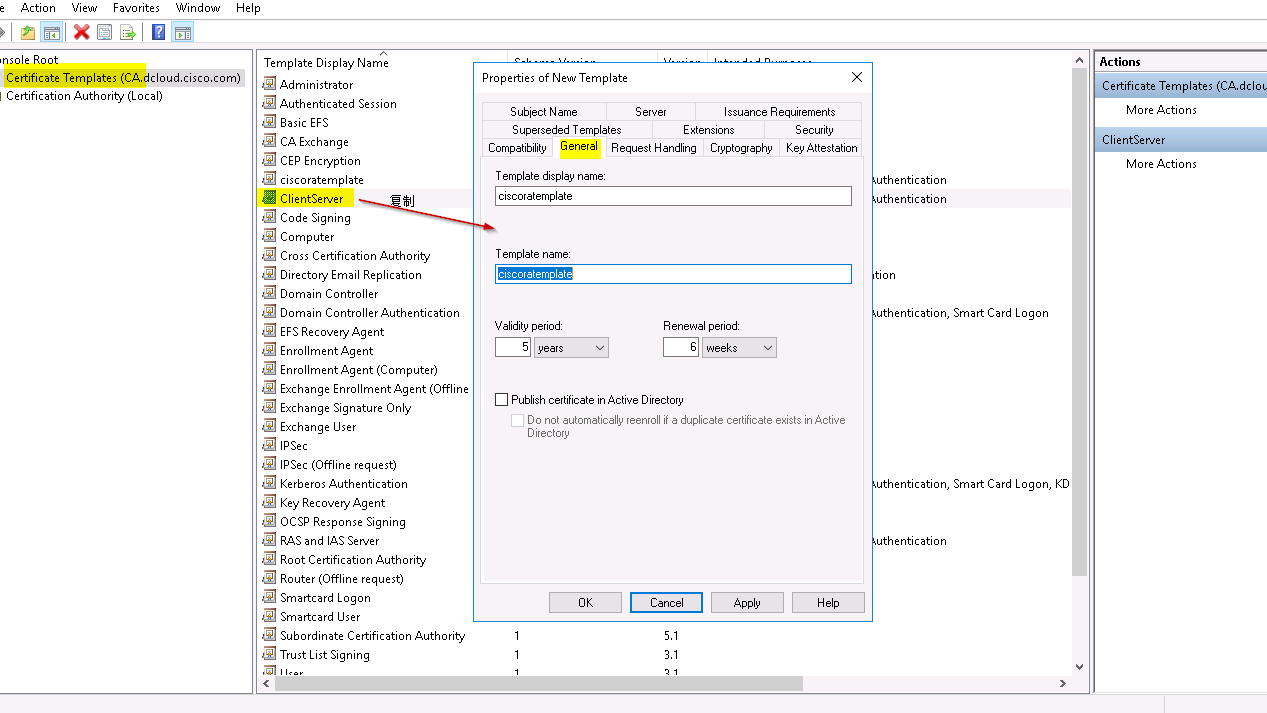
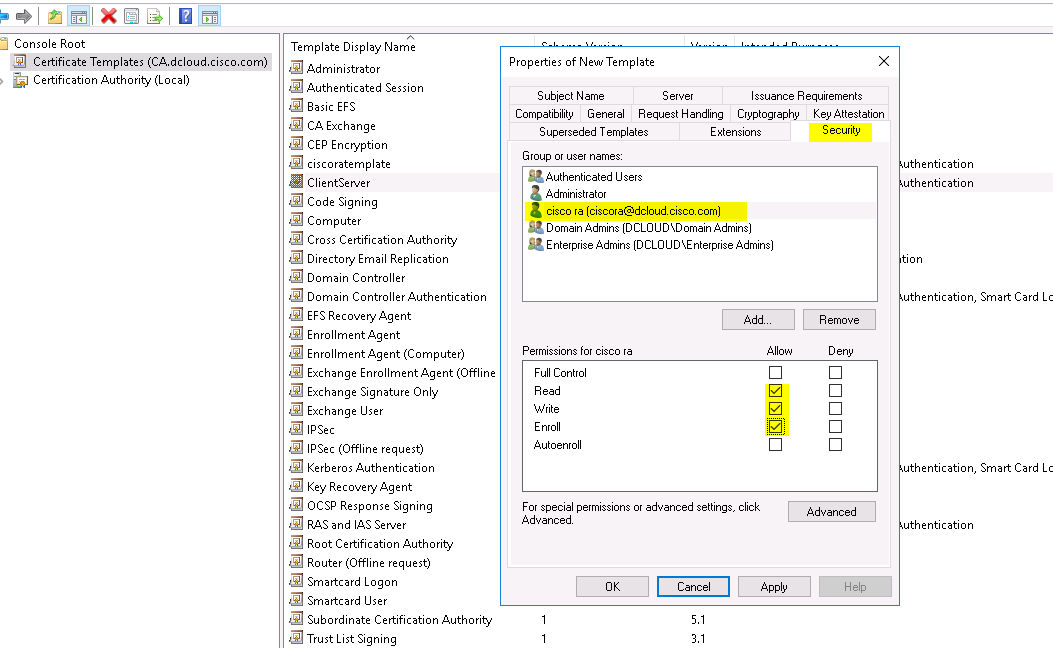
CA automatic enterprise CA endpoint Certificate enroll
MMC.exe
![Console I - [Console Root]
File Action Viewu Favorites
Console Root
Windowu
Help
Name
Add or Remove Snap-ins
There are no items to shouu in this viewu.
Actions
More Actions
You can select snap-ins For this console From those available on your computer and configure the selected set OF snap-ins. For
extensible snap-ins, you can configure which extensions are enabled.
Available snap-ins:
Vendor
Snap-in
Microsoft Cor..
Active Directory Do...
Active Directory Site... Microsoft Cor..
Microsoft Cor...
Active Directory Use...
ActiveX Control
Microsoft Cor...
2
AD51 Edit
Microsoft Cor...
Authorization Manager
Microsoft Cor...
Certificate Templates
Microsoft Cor...
Certificates
Microsoft Cor..
Certification Authority
Microsoft Cor...
Microsoft Cor..
Component Services
Microsoft Cor...
Computer Managem.
Microsoft Cor..
Device Manager
Disk Management
Microsoft and..
Description:
Selected snap-ins:
Console Root
Certificate Templates
Certification Authority (Local)
Add >
Edit Extensions...
Remove
Move up
Move Down
Advanced...
Allows you to configure certification authority properties and to manage certificates issued by this CA.](https://lh5.googleusercontent.com/ujlDCB3o-qtX-GI8-hxx6HfKtqN4NFtO8xSNVKVmf6qhI1sQdkaWopn7Lx31_t576Tb_h-Uw3D6yZhoEFBs_3lBLxK8dfGAzyfeYleogzjSgGxYYQgcaTEqAZTzK7vczWq-YFQCd)
![Console I - [Console Root\Certification Authority Templates]
File Action Viewu Favorites Windowu Help
zdl
Console Root
Certificate Templates (CA.dcIoud.cisco.com)
Certification Authority (Local)
dcIoud-CA
Revoked Certificates
Issued Certificates
Pending Requests
Failed Requests
Certificate Temp at
> cenøne temmate to
Name
ciscoratemplate
ClientServer
Web Server 5y
Directory Email Replication
Domain Controller Authentication
Kerberos Authentication
EFS Recovery Agent
Basic EFS
Domain Controller
Web Server
Computer
Subordinate Certification Authority
Administrator
Intended Purpose
Client Authentication, Server Authentic...
Server Authentication, Client Authentic...
Server Authentication
Directory Service Email Replication
Client Authentication, Server Authentic...
Client Authentication, Server Authentic...
File Recovery
Encrypting File System
Client Authentication, Server Authentic...
Server Authentication
Client Authentication, Server Authentic...
Encrypting File System, Secure Email, Cl...
Microsoft. Trust List Signing, Encrypting...](https://lh5.googleusercontent.com/ktS5uohznaRRjkpZPGjxxRQ9R6ZtHUh7If73xyOimTZTeCB0W_5lZSDrB6wSQhaOo7SCMBsT_wB9HxbV0K04gMBRJpSsP96nEyXW3RS8kybdadxW4j-PfO6neGpOZjwlzmqDJs3y)
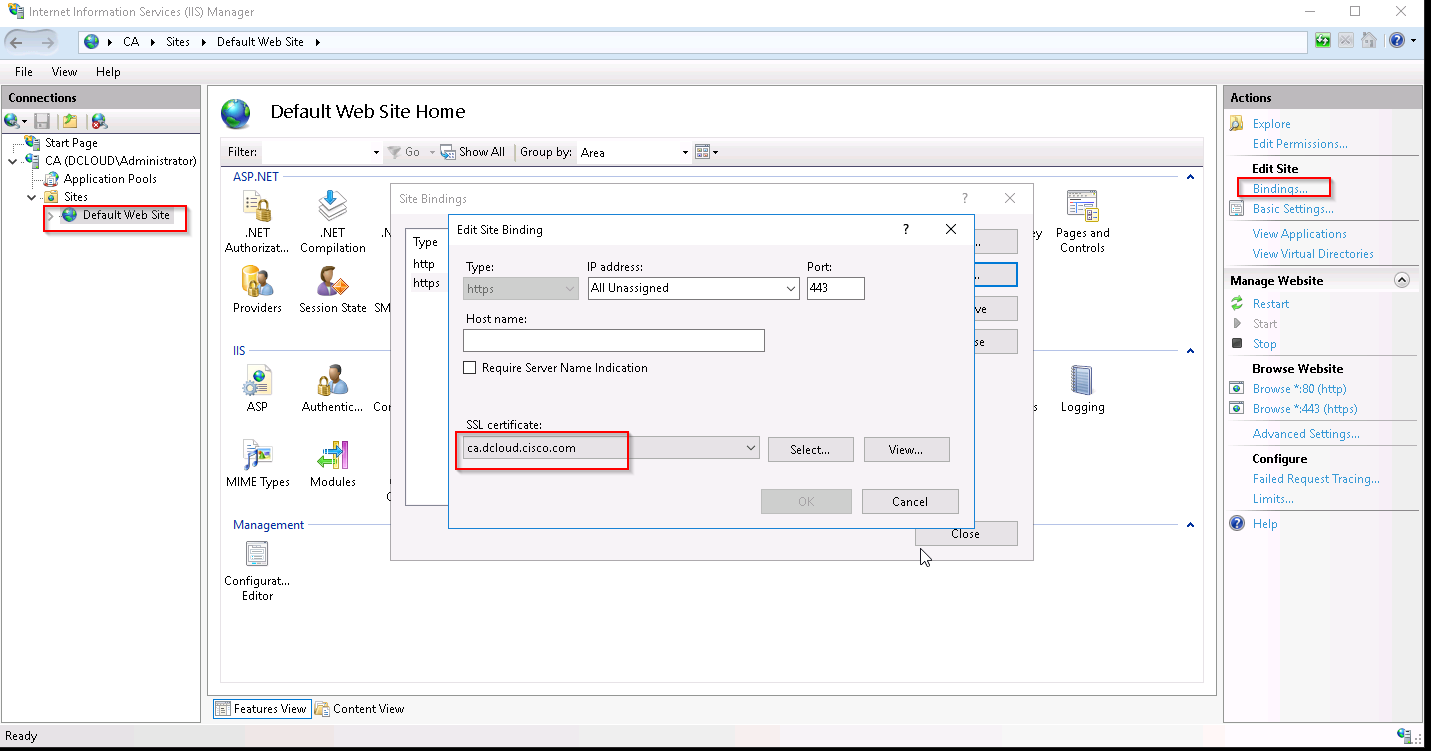
stop then start the service
CUCM :
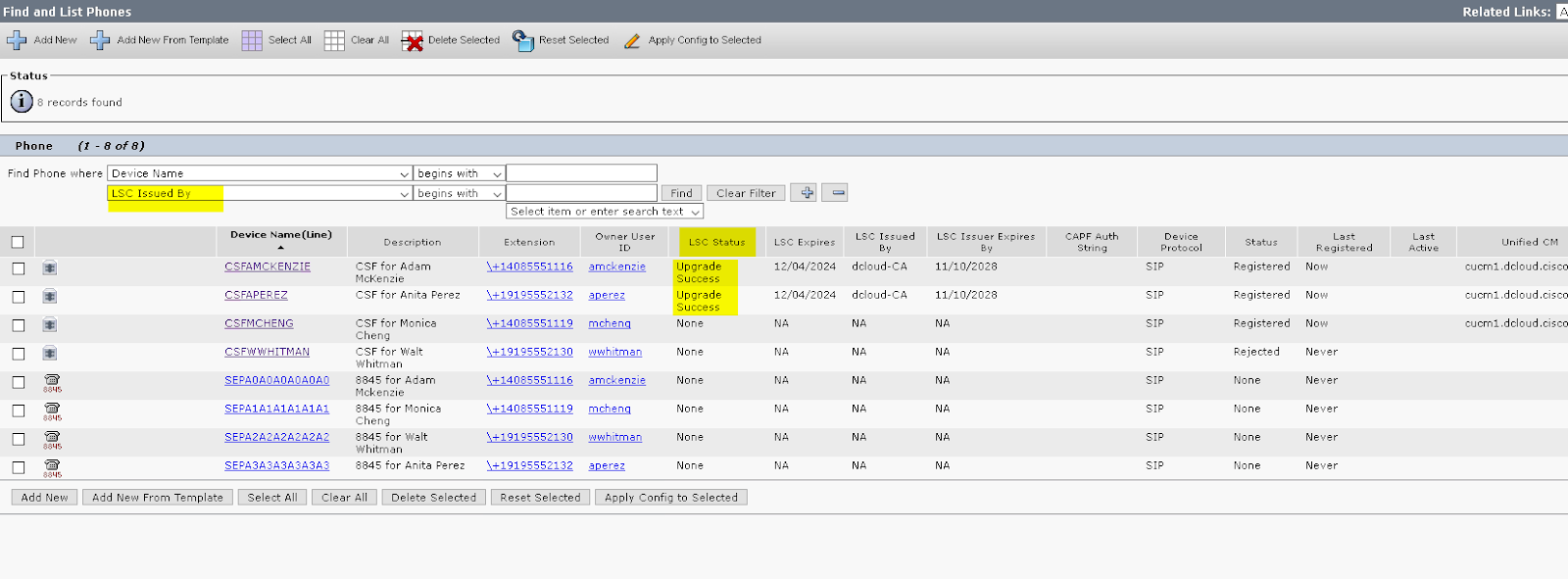
Upload root cert as CAPF-Trust
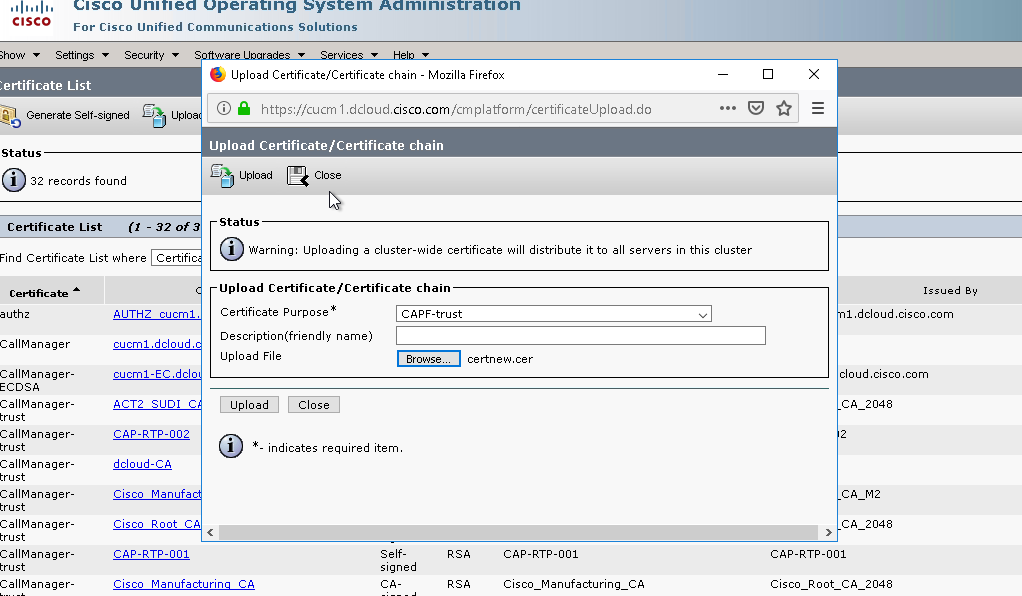
CAPF-trust is used for CAPF/cisco registration authority via https toIIS. Callmanager-trust is used for trust of LSC cert(secured tftp)
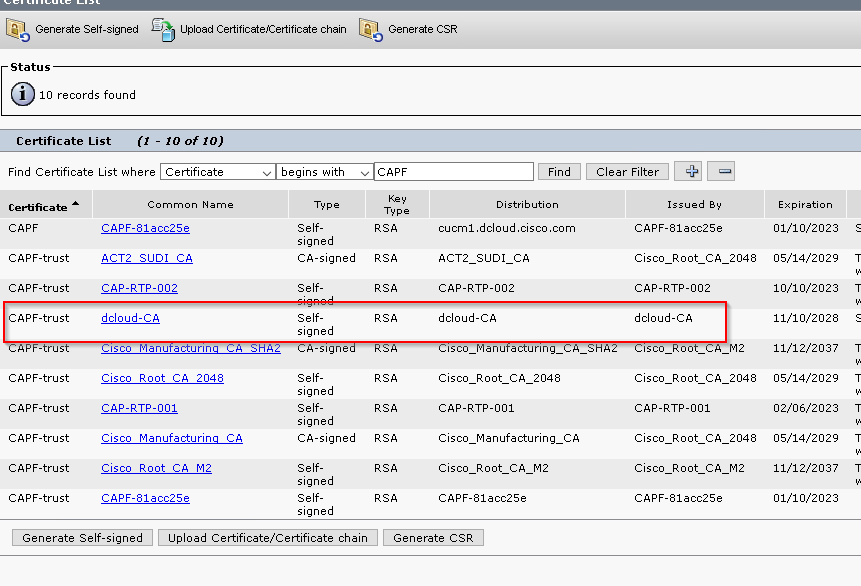
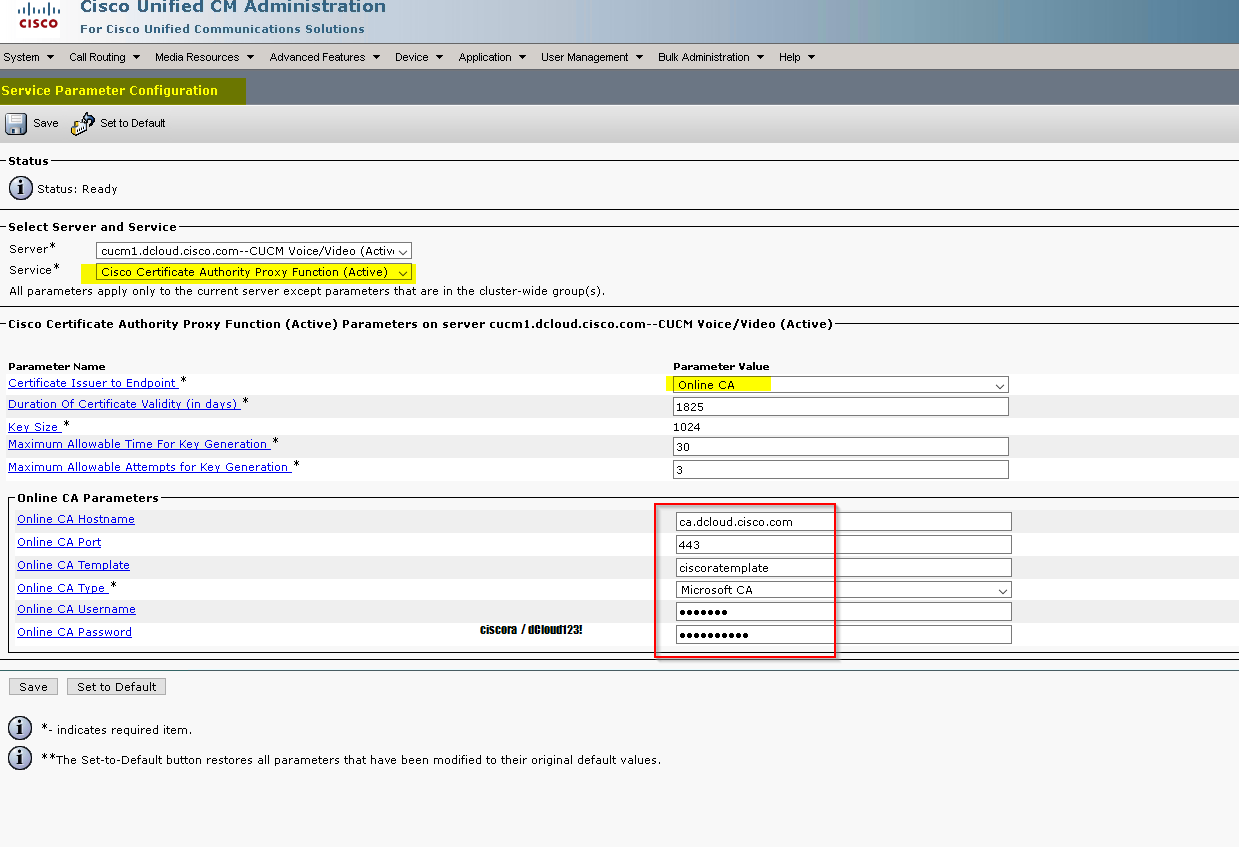
restart Cisco Certificate Authority Proxy Function
LCS installation,only for hardware phone
CUCM enables mix mode
admin:utils ctl set-cluster mixed-mode
This operation will set the cluster to Mixed mode. Auto-registration is enabled on at least one CM node. Do you want to continue? (y/n): y
restart Callmanager service
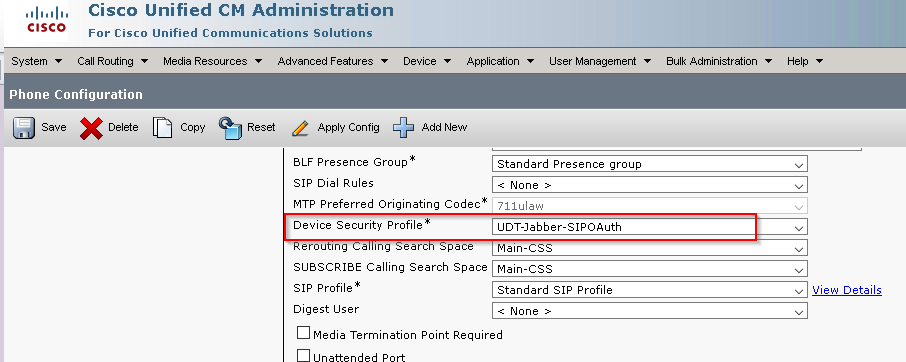
Phone
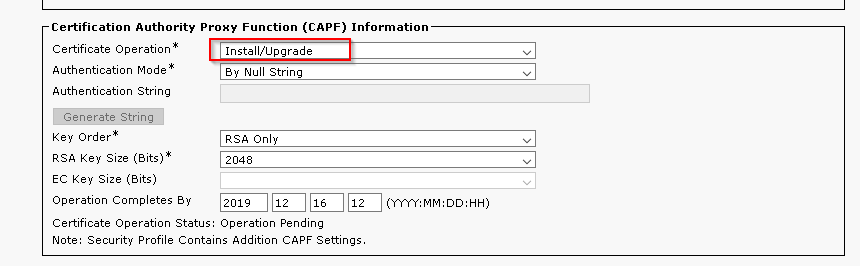
if CSF also add:
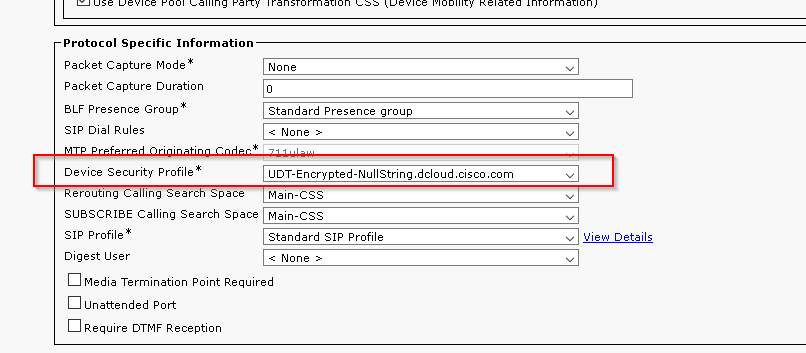
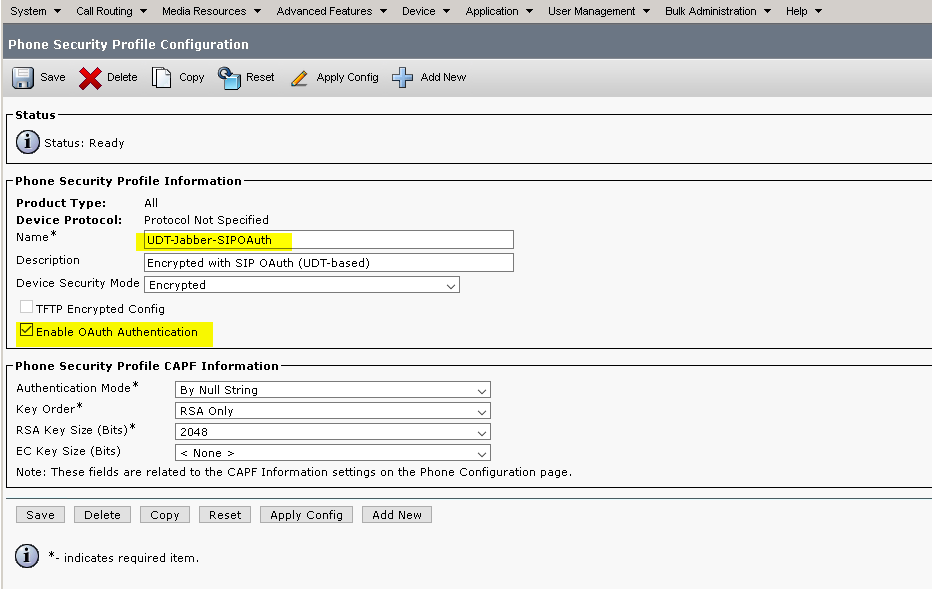
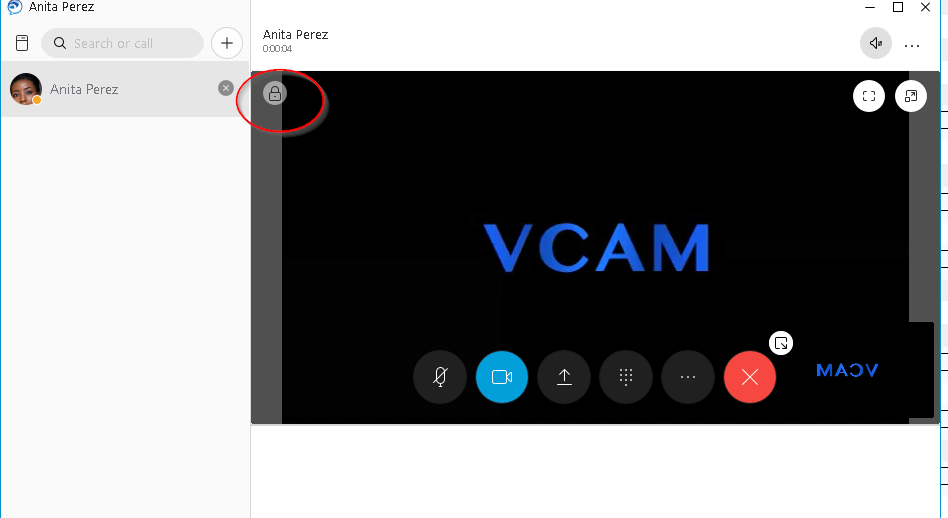
SIP OAuth (line side) on-prim Jabber Encrypted Call
SIP OAuth (line side) on-prim Jabber Encrypted Call
CUCM12 no need for mix mode
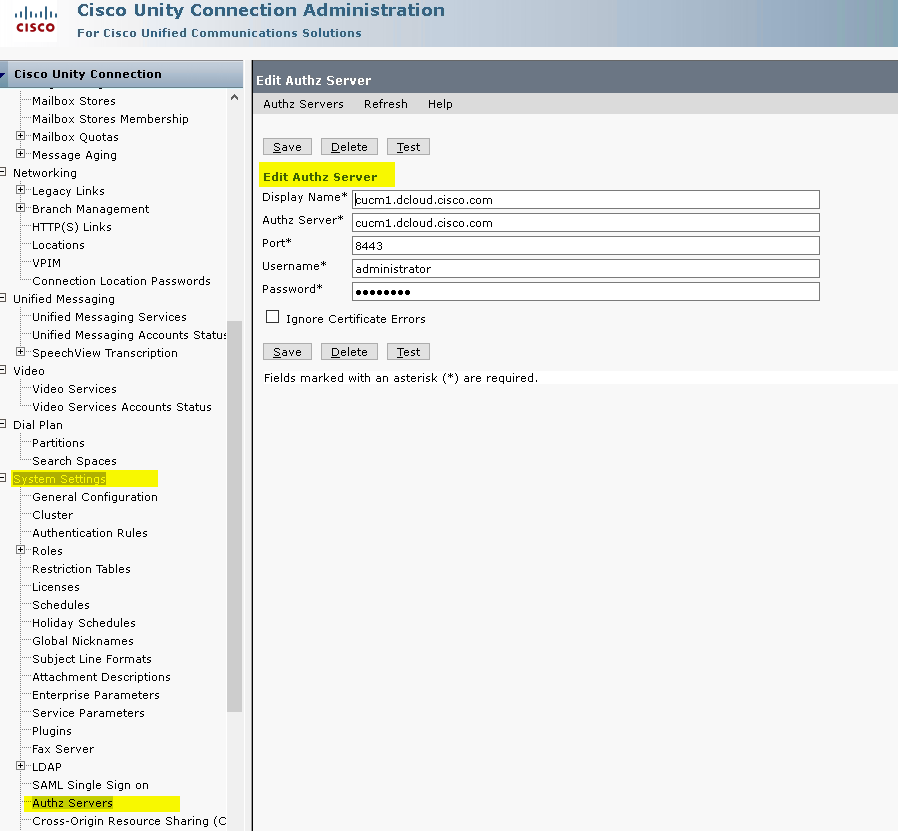
UnityCN:
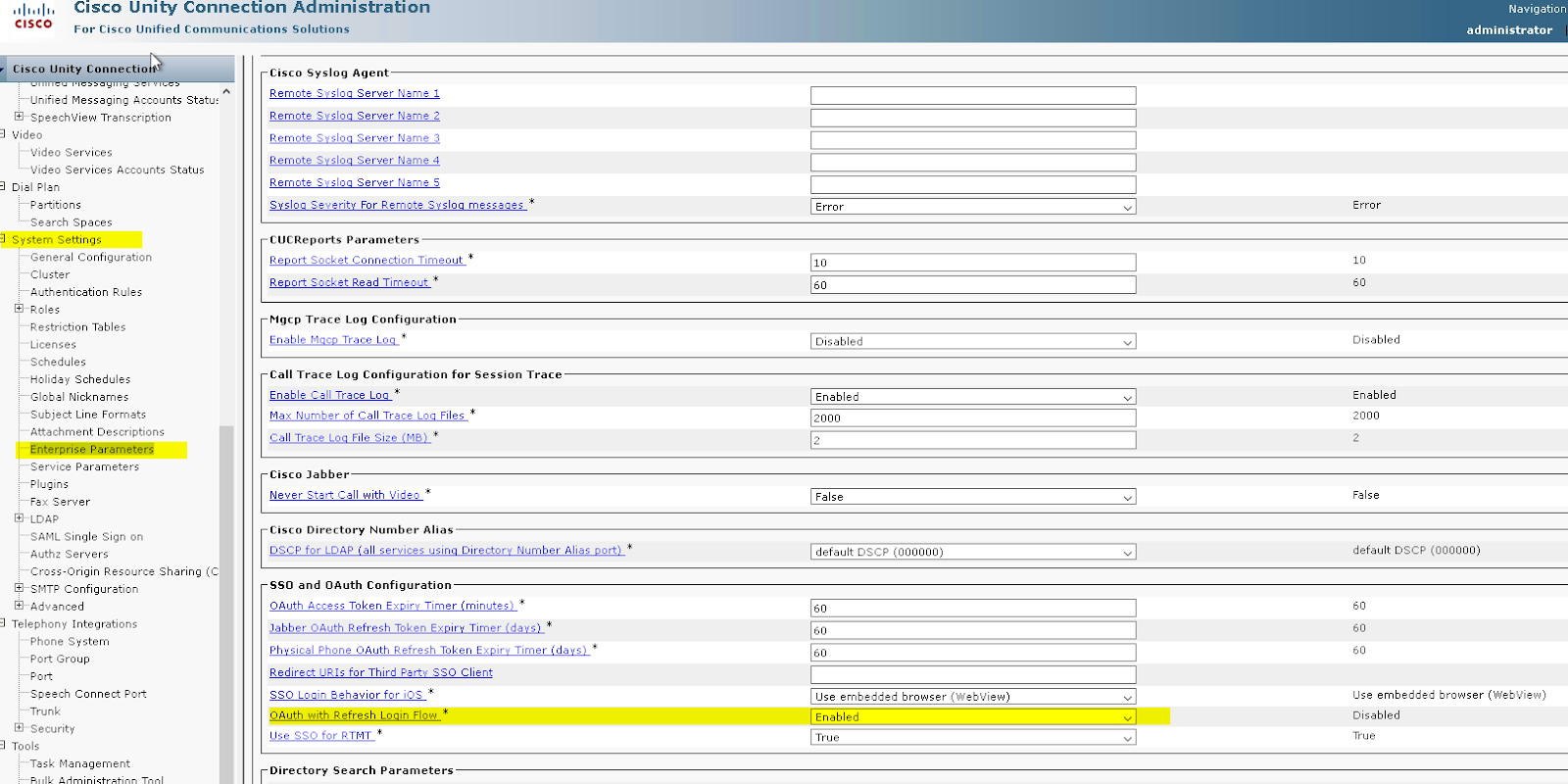
check jabber voicemail button
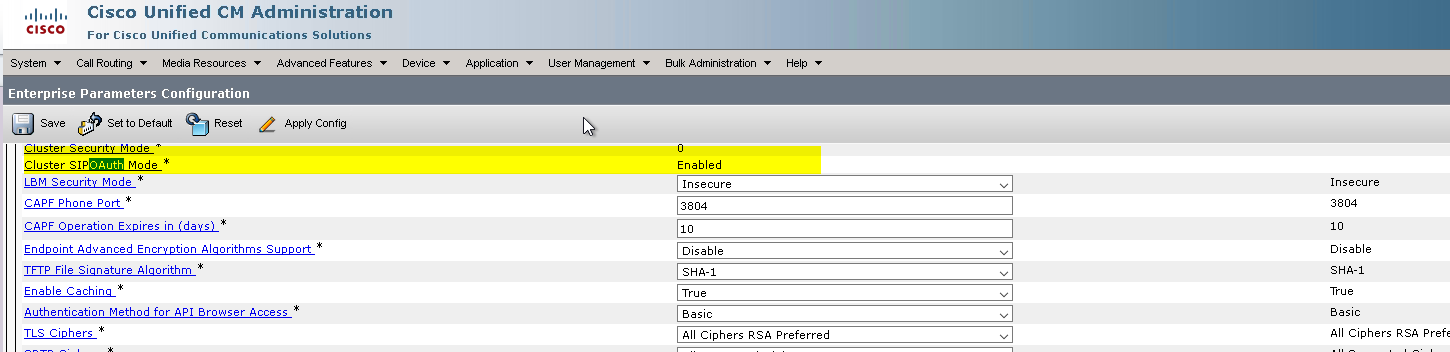
CUCM:
admin:utils sipOAuth-mode enable
SIP OAuth Mode already enabled.
restart callmanager service
System > Security > Phone Security Profile
Wednesday, 24 April 2019
Cisco CMS Clustering and Redundancy
Cisco CMS Clustering and Redundancy
Create Database Master on CMS1
Enter the command: database cluster localnode a
Then enter the command: database cluster initialize
Confirm enter: Y
Connect Second and third CMS to Master
Enter the command: database cluster localnode a
Then enter the command: database cluster join CMS1_IP
Confirm join by entering: Y
Run command: database cluster upgrade_schema
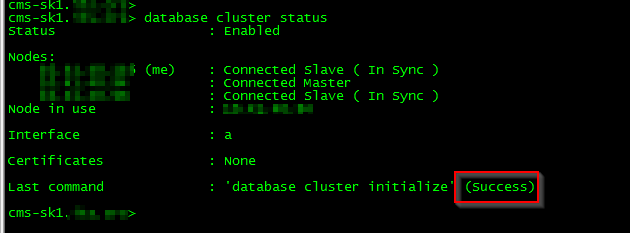
Verify cluster status
Create Call Bridge Cluster

Three Callbridges
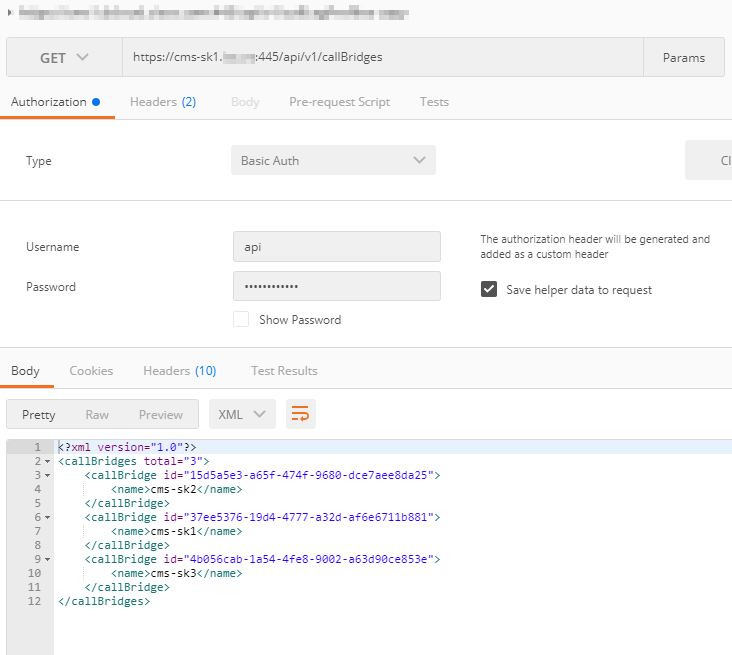
Create CallbridgeGroups
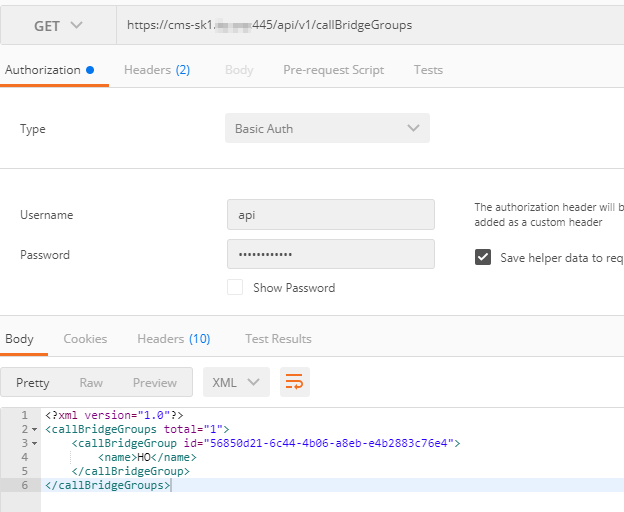
Assign callBridgeGrou “HO” to each callBridge

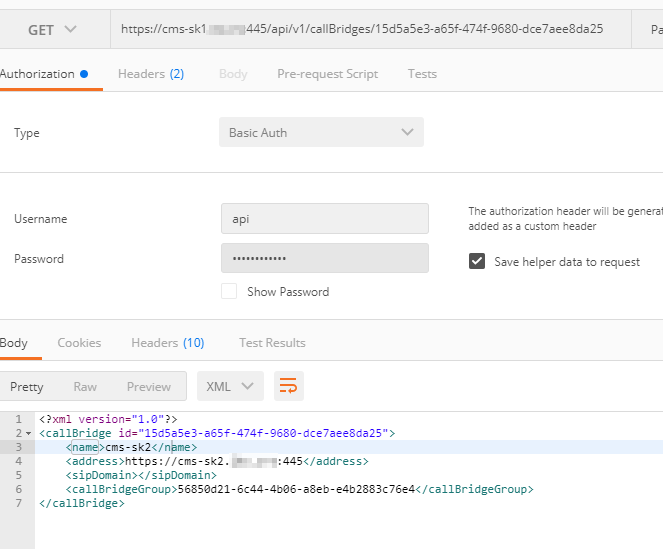
callBridgeGroup loadbanance

Monday, 25 March 2019
Extension Mobility / Extension Mobility Cross Cluster (EM/EMCC)
Extension Mobility / Extension Mobility Cross Cluster
(EM/EMCC)
Prior to certificate consolidation, start with the cluster ID naming and Certificate export/consolidate/import is already in place for two clusters
EMCC devices available per cluster is already set to 100. Assumption is that no more than 100 EMCC users will be concurrently visiting the same cluster and use EMCC, if this is the case, it’s safe to increase the limit to 500 EMCC device. This change from 100 to 500 will not cause any IP Phone interruption.
- Add EMCC IP Phone Service:
Where X.X.X.X represents the IP Address of the CUCM node where EM service is activated/started.
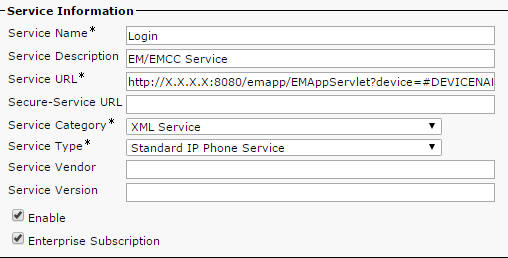
Make sure to enable “Enterprise Subscription”, this check box will appear once only when a new service is added.
Enable EM on IP Phones:

- Create one partition and create one calling search space, assign the created partition to the created calling search space for emergency calling.

- Create extension mobility User Device Profile for end users. On the Device Profile Configuration page, for the “Extension Mobility Cross Cluster CSS” assign the CSS created in step 3.

- On the end user page assign the EM profile and enable EMCC

And

- Add emergency route pattern(s). Partition accessible by the calling search space assigned to UDP “Extension Mobility Cross Cluster CSS”. The Gateway/Route List MUST point to a Standard Local Route Group.
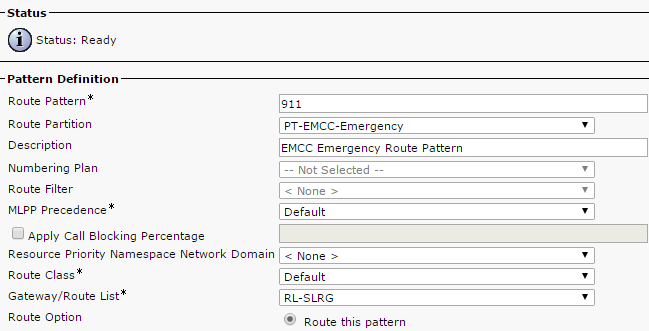
- Add Geo location filter to match:

- add/update GEO Location configuration. Example of GEO Location:
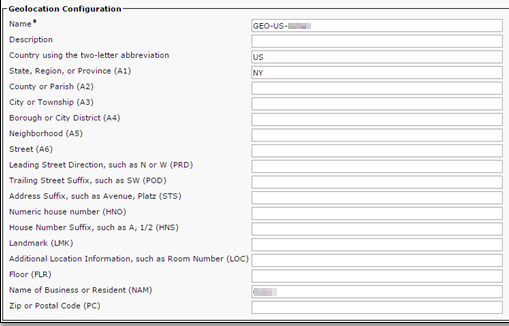
- On all IP Phone Device Pools, add the GEO Location Configuration created. Do not apply any GEO Location filter here.

- Add Roaming GEO Location configuration that will match the GEO Location configuration set on the visiting phone. This is necessary to place the visiting IP Phone in the correct Roaming device pool.
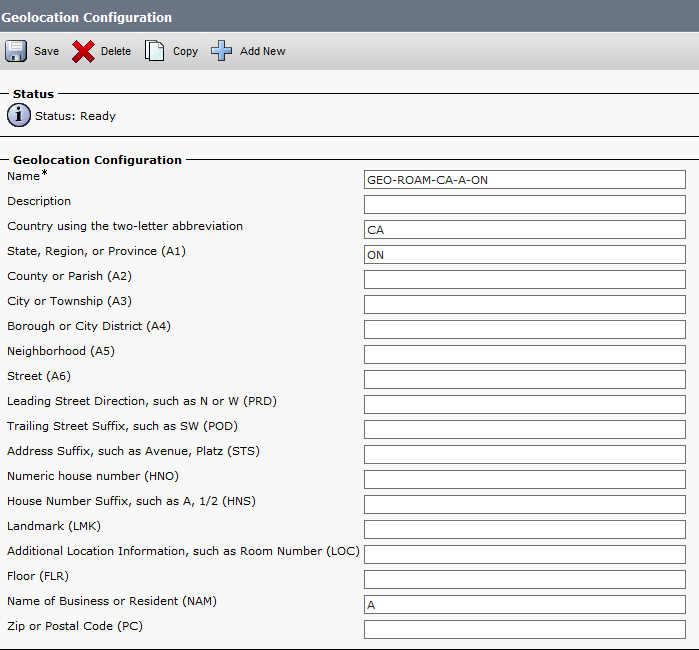
- Add Roaming Device Pool and apply the filter. Roaming device pool must reflect the correct time zone of the visiting cluster. Apply the GEO Location filter here. On the same Roaming device pool, make sure the correct Media Resource Group list is selected.


- Create EMCC SIP Trunk. Critical: the Trunk’s Inbound CSS MUST have access the emergency Route Pattern(s) partition used by the users on the visiting cluster.
- EMCC Feature Configuration. EMCC Region Max Audio Bit Rate value must be the same on all cluster participating in the EMCC network.

- EMCC Inter-cluster Service Profile. Validation must be successful.

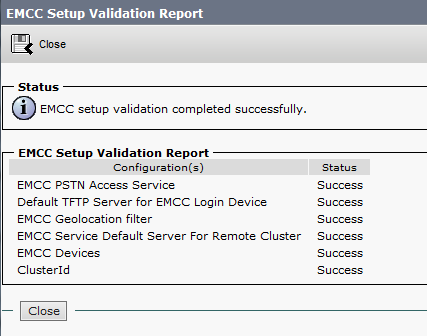
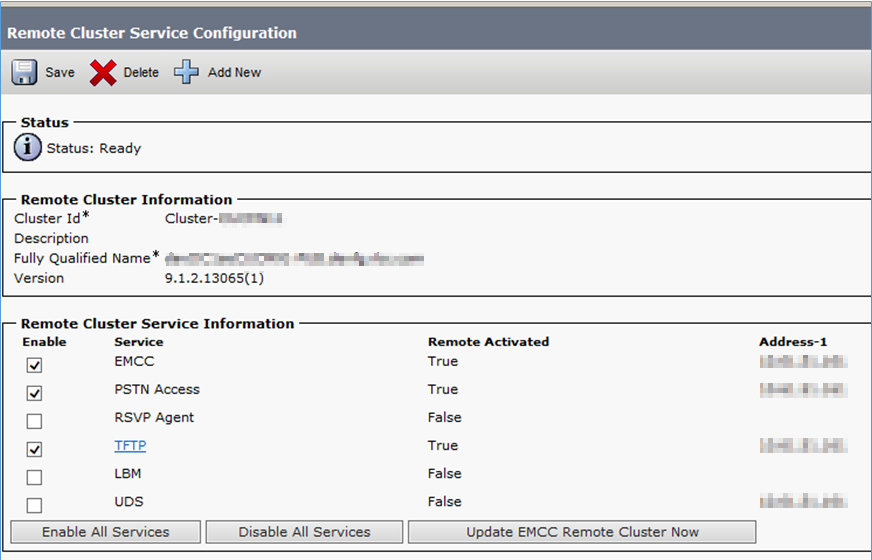
- Configure Cluster View. EMCC/TFTP enabled.
Tuesday, 19 March 2019
SME - Global Dial Plan Replication(GDPR)
Session Management Edition -- Global Dial Plan Replication(GDPR)
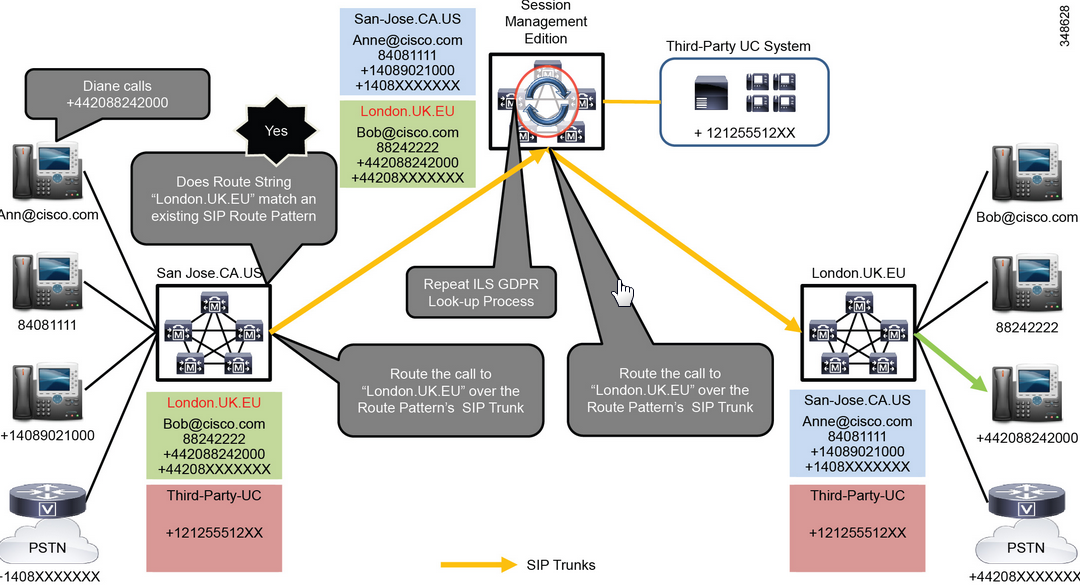
A Global Cisco Unified Communications Session Management Edition (Unified CM SME) which is a trunk and dial plan aggregation component for multi-site distributed call processing deployments. The Global SME is essentially a Cisco Unified Call Manager Cluster with trunk interfaces and no IP endpoints. It enables aggregation of multiple Cisco communications telephony systems, known as leaf clusters.
Centralized routing diagram

Main purpose
- Centralize dial plan
- Connectivity to 3rd party session management
- Dial Patterns dynamics (automation)
Server Function for CUCM will fit into one or more of the following feature sets:
- Publisher
- Subscriber
Publisher Service Activation
Servers
|
Service Name
|
Activation Status
|
Publisher
This server is responsible for all of the administration updates to the other servers in the cluster. It must communicate with all other servers.
Additionally this server is used for the following functions:
Due to the administration overhead, Call control (Cisco CallManager), TFTP (Cisco TFTP) and media resource (Cisco IP Voice Media Streaming Application) functionality has been disabled, as to prevent CPU over-utilization.
Encryption services are also disabled, as this feature is not being deployed.
|
Cisco CallManager
|
Deactivated
|
Cisco Messaging Interface
|
Deactivated
| |
Cisco Unified Mobile Voice Access Service
|
Deactivated
| |
Cisco IP Voice Media Streaming App
|
Deactivated
| |
Cisco CTIManager
|
Deactivated
| |
Cisco Extension Mobility
|
Deactivated
| |
Cisco Extended Functions
|
Deactivated
| |
Cisco DHCP Monitor Service
|
Deactivated
| |
Cisco Intercluster Lookup Service
|
Activated
| |
Cisco Dialed Number Analyzer Server
|
Activated
| |
Cisco Dialed Number Analyzer
|
Activated
| |
Cisco TFTP
|
Deactivated
| |
Cisco IP Manager Assistant
|
Deactivated
| |
Cisco WebDialer Web Service
|
Deactivated
| |
Cisco SOAP - CDRonDemand Service
|
Deactivated
| |
Cisco CAR Web Service
|
Deactivated
| |
Platform SOAP Services
|
Activated
| |
Cisco AXL Web Service
|
Activated
| |
Cisco UXL Web Service
|
Activated
| |
Cisco Bulk Provisioning Service
|
Activated
| |
Cisco TAPS Service
|
Deactivated
| |
Cisco Serviceability Reporter
|
Activated
| |
Cisco CallManager SNMP Service
|
Activated
| |
Cisco CTL Provider Activated
|
Deactivated
| |
Cisco Certificate Authority Proxy Function
|
Deactivated
| |
Cisco DirSync
|
Activated
|
Subscriber Service Activation
Servers
|
Service Name
|
Activation Status
|
Subscribers
** Cisco AXL Web Service will only be enabled for Sub1 and Sub2 on each cluster
All Subscribers
|
Cisco CallManager
|
Activated
|
Cisco Messaging Interface
|
Deactivated
| |
Cisco IP Voice Media Streaming App
|
Deactivated
| |
Cisco CTIManager
|
Deactivated
| |
Cisco Extension Mobility
|
Deactivated
| |
Cisco Extended Functions
|
Activated
| |
Cisco DHCP Monitor Service
|
Deactivated
| |
Cisco Dialed Number Analyzer Server
|
Deactivated
| |
Cisco Dialed Number Analyzer
|
Deactivated
| |
Cisco TFTP
|
Deactivated
| |
Cisco IP Manager Assistant
|
Deactivated
| |
Cisco WebDialer Web Service
|
Deactivated
| |
Cisco SOAP Services
|
Deactivated
| |
Cisco AXL Web Service
|
Activated**
| |
Cisco UXL Web Service
|
Deactivated
| |
Cisco TAPS Service
|
Deactivated
| |
Cisco Serviceability Reporter
|
Deactivated
| |
Cisco CallManager SNMP Service
|
Activated
| |
Cisco CTL Provider
|
Deactivated
|
To ensure that the endpoints’ codec preferences are trusted as calls pass through SME, enable the SIP Profile feature “Accept Audio Codec Preferences in Received Offer” on all SIP Trunks.

Global Dial Plan Replication – GDPR and ILS
Intercluster lookup Service
(ILS)
|
The Intercluster Lookup Service (ILS) feature is used to interconnect multiple clusters together. With the ILS cluster discovery service it provides clusters to dynamically learn about remote clusters within the ILS network. ILS also supports the Global Dial Plan Replication (GDPR) feature. ILS and GDRP work together to dynamically share the global dial plan with all clusters within the ILS network.
|
Global Dial Plan Replication(GDPR) |
The Global Dial Plan Replication (GDPR) feature uses the ILS feature to share dial plan information between clusters within the ILS network. The information is captured by a centralized hub cluster which then propagates to all connected spoke clusters.
|
Menu: Advance Features > ILS Configurations; Select Role: For SME: ‘Hub Cluster’
Leaf clusters: ‘Spoke Cluster’

In the ‘ILS Cluster Registration’ pop up window, input in ‘Registration Server’: For SME: leave blank and click OK; For Leaf: Enter IP of Publisher node of hub cluster and click OK

Input check for ‘Exchange Global Dial Plan Replication Data with remote Clusters’

Enter route string for Cluster, which will populate, to all clusters within the ILS network. Keep default of 10 minutes for ‘Synchronize Clusters Every’ field. Route string naming convention:The route string will be a combination of Cluster ID + ‘.ils’. Example: ClusterXXX.ils

For ILS Authentication there are two options to choose from, via TLS certificates or by password. The Password would be the same entered on all clusters.

ILS network Verification
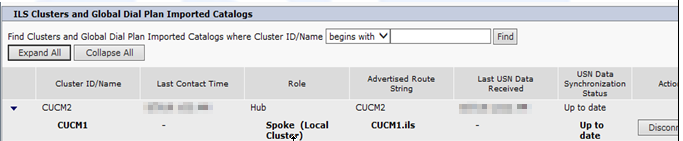
Once you have the first two networks configured, Hub and a spoke, verify connectivity at top of page. You may need to click on refresh button a few times. You can also temporary reduce ‘Synchronize Clusters Every’ to 1 minute. The screen capture below indicates there is 1 hub and 1 spoke.
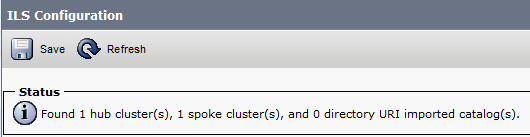
View from Hub:
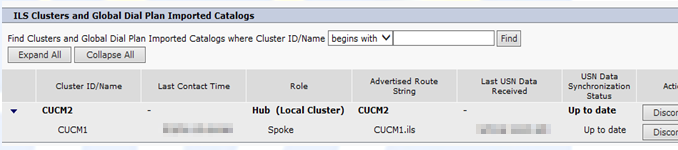
View from Spoke:
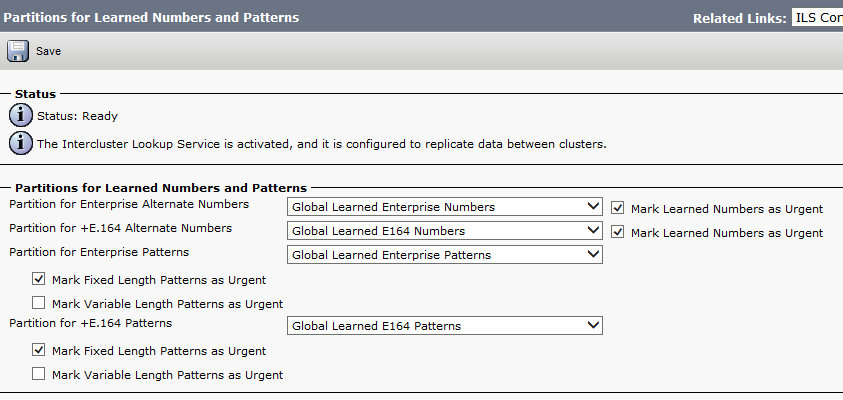
Partitions for Learned Numbers and Patterns
Configure SIP route patterns
Call Routing > SIP Route Pattern
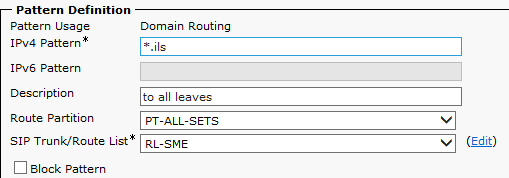
For SME: create a SIP Pattern for each cluster it is connected to and assign the associated trunk for that clusters.
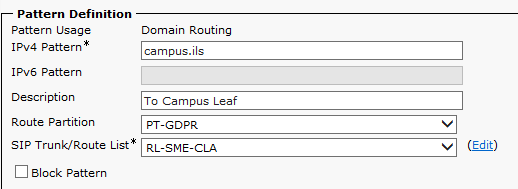
For Leafs: You only need to create one SIP Pattern in each leaf.
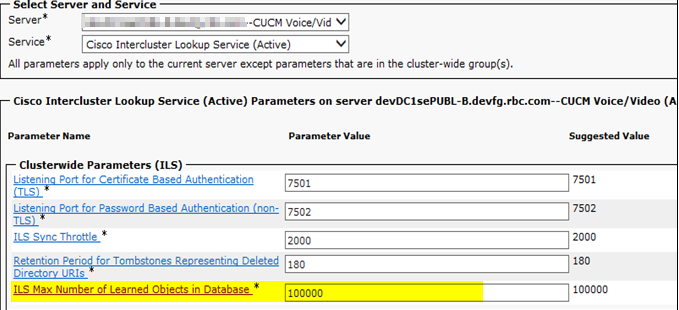
ILS Service Parameter configuration
Determine the required max number of learned objects.
ILS advertises locally configured enterprise alternate numbers and +E.164 alternate numbers to the ILS network where the Advertise globally via ILS option has been selected.
Click: Add Enterprise Alternate Number

Subscribe to:
Posts (Atom)