Showing posts with label Cisco Jabber. Show all posts

Sunday, 20 March 2022


Expressway MRA Encrypted call and ICE Media Path Optimization

Exp-C


CISCO 
Cisco Expressway-C 
Status 
System Configuration 
Maintenance 
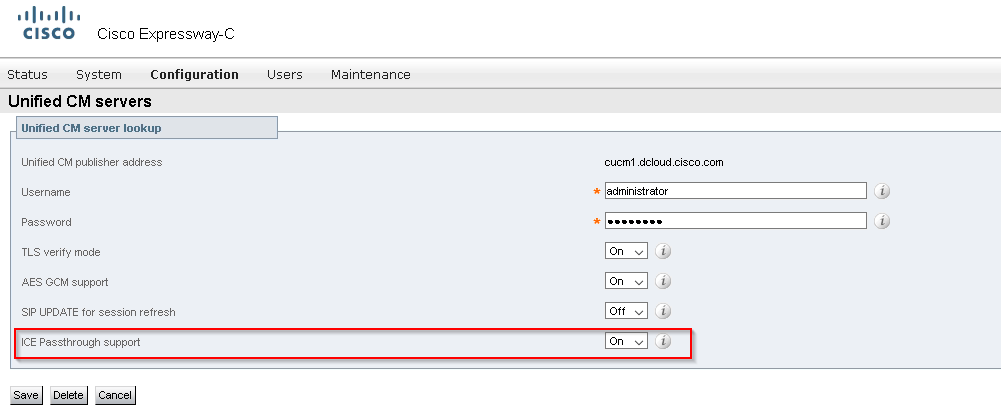
Unified CM servers 
Unified CM server lookup 
Unified CM publisher a 
Username 
Password 
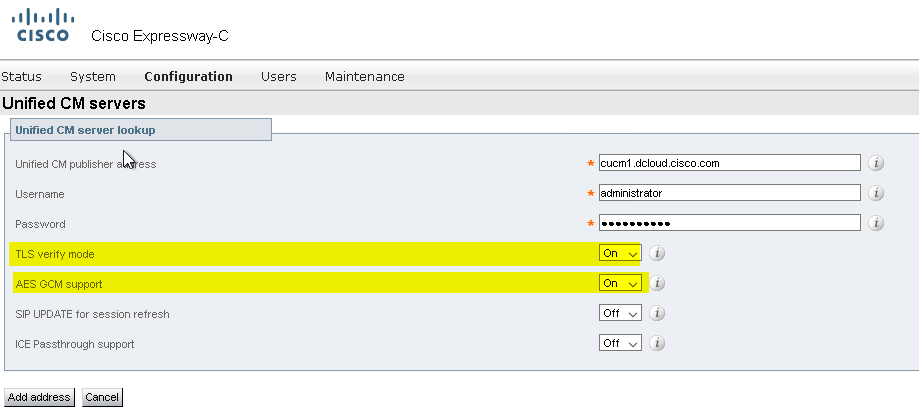
TLS verity mode 
AES GCM support 
SIP UPDATE tor session refresh 
ICE Passthrough support 
cucml dcloudciscocom 
administrator


CISCO 
Status 
Cisco Expressway-C 
System Configuration 
Maintenance 
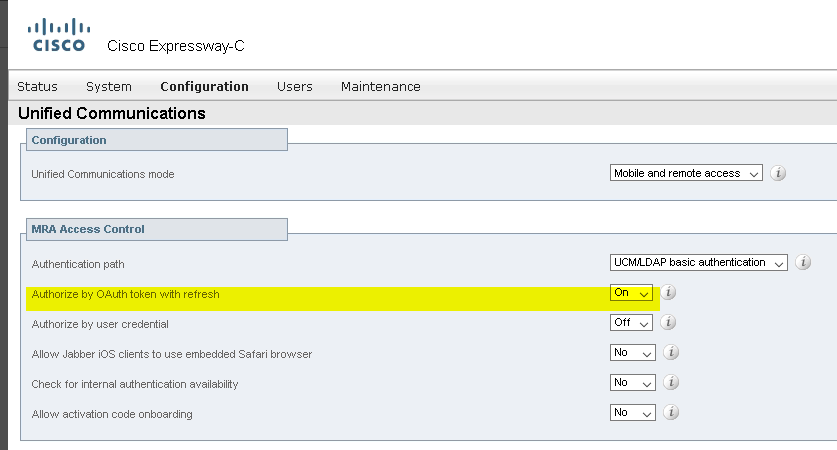
Unified Communications 
Configuration 
Unified Communications mode 
MRA Access Control 
Authentication path 
Authorize by OAuth token with refresh 
Authorize by user credential 
Allow Jabber iOS clients to use embedded Safari browser 
Check tor internal authentication availability 
Allow activation code onboarding 
Mobile and remote access 
LICMA_DAP basic authentication


CISCO 
Cisco Expressway-C 
Status 
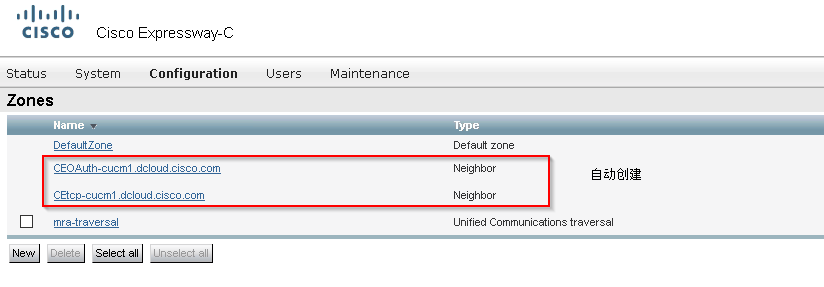
Zones 
System 
Name 
DetautZone 
Configuration 
CEOAuth-cucmI dcloudciscocom 
CEtco-cucmI dcloudciscocom 
mra-traversal 
Maintenance 
Detaut zone 
Neighbor 
Neighbor 
Unified Communications traversal


Search rules 
Priority 
Rule name 
Ctlcø-cucml uciouüCiscocom 
CEOAuth-cucmI dcloudciscocom 
LocalZoneMatch 
Protocol 
Source 
Authentication required 
Mode 
Alias pattern match 
Alias pattern match 
Any alias 
Pattern type 
Pattern string 
cucml 
cucml dcloudciscocom:50gI


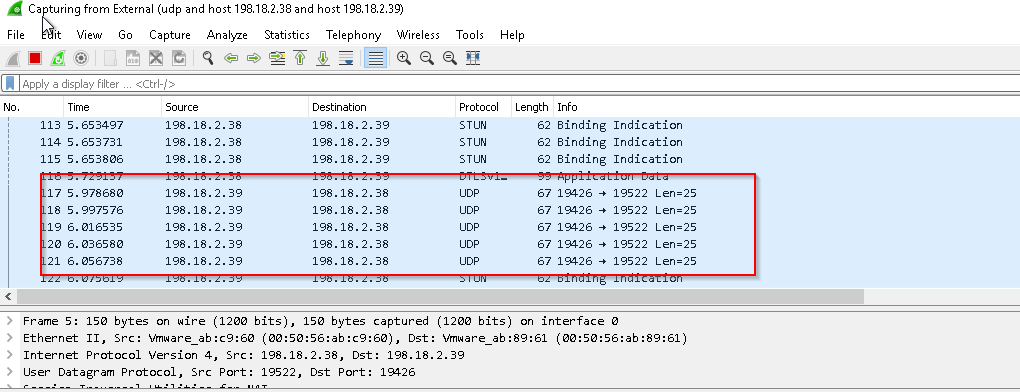
ICE Optimization,packet capture Jabber calls not via expressway


udp and host 198.18.2.38 and host 198.18.2.39


CISCO 
Status 
Cisco Expressway-C 
System 
Configuration 
Maintenance 
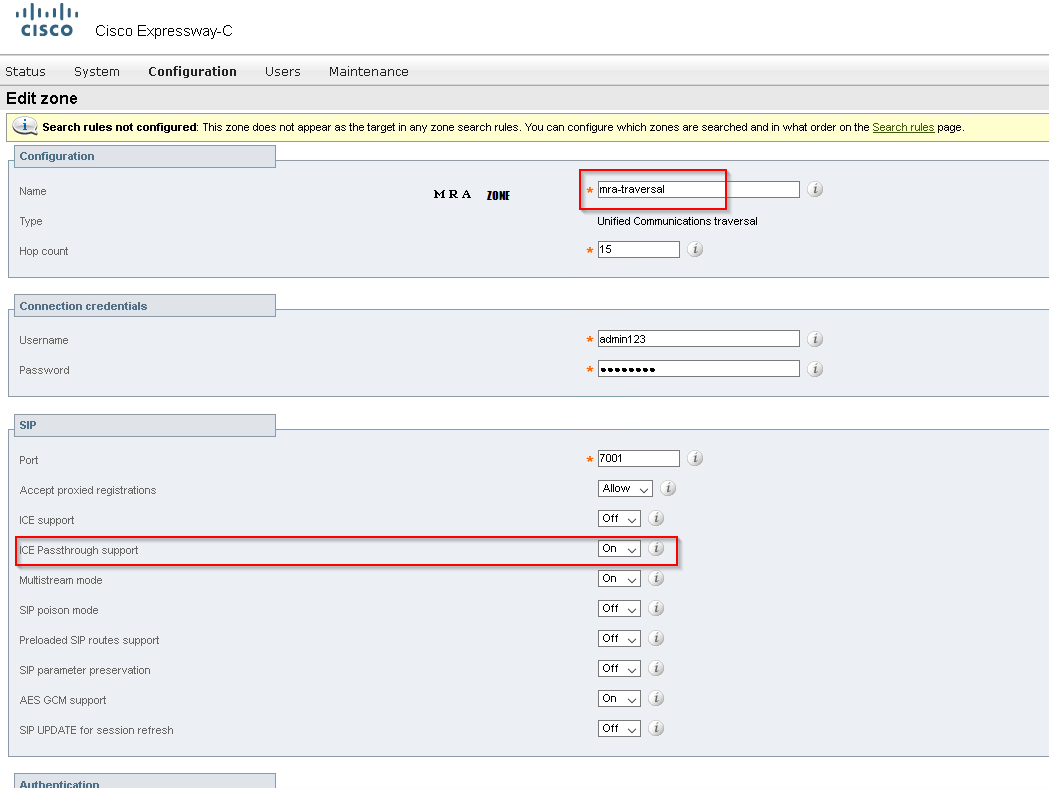
Edit zone 
Search rules not configured ThE rot the target n anv tone search h'c•u cc•rnlgure are searched and Ir. what Drear cr. the 
page 
Configuralion 
Name 
Hop count 
Connerlion credent•dls 
Username 
Password 
Accept proxied registrations 
ICE support 
CE Passthrough support 
Mutistream mode 
SIP poison mode 
Preloaded SIP routes support 
SIP parameter preservation 
AES GCM support 
SIP UPDATE tor session refresh 
mra-traversal 
Unified Communications traversal 
adminl 23

on expC, UC> CUCM enable ICE passthrougth

CISCO 
Cisco Expressway-C 
Status 
System Configuration 
Maintenance 
Unified CM servers 
Unified CM server lookup 
Unified CM publisher address 
Username 
Password 
TLS verity mode 
AES GCM support 
SIP UPDATE tor session refresh 
ICE Passthrough support 
cucml dcloudciscocom 
administrator


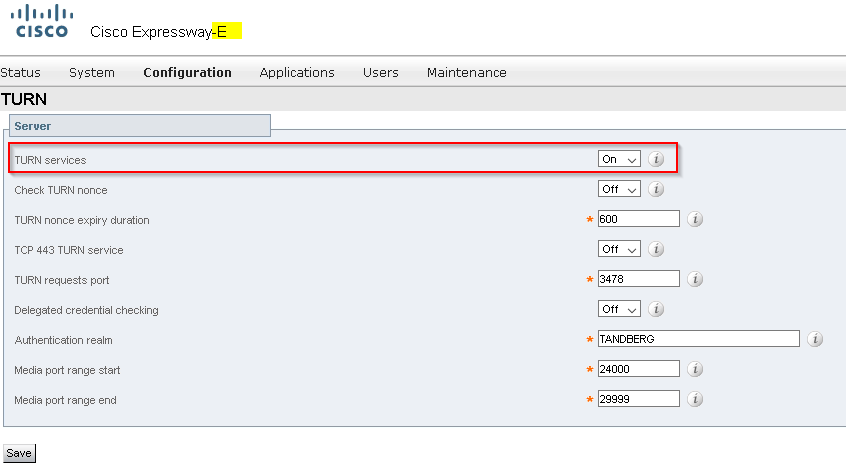
expE enables Turn 

Configuration > Traversal > TURN

CISCO 
Cisco Expressway-E 
Status 
TURN 
Server 
System 
Configuration 
Applications 
Maintenance 
TURN services 
Check TURN nonce 
TURN nonce expiry duration 
TCP 443 TURN service 
TURN requests pod 
Delegated credential checking 
Authentication realm 
Media pod range start 
Media pod range end 
3478 
TANDBERG 
24000 
2gggg

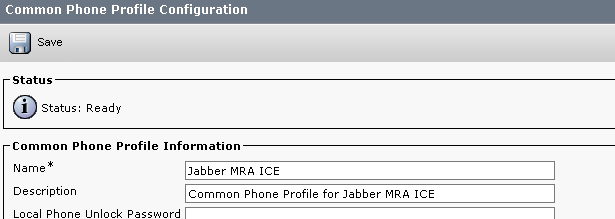
CUCM copies Standard Common Phone Profile

Common Phone Profile Configuration 
Save 
Status 
Status: Ready 
Common Phone Profile Information 
Name 
Description 
Local Phone 
Unlock 
Jabber MRA ICE 
Common Phone Profile for Jabber MRA ICE 
Password


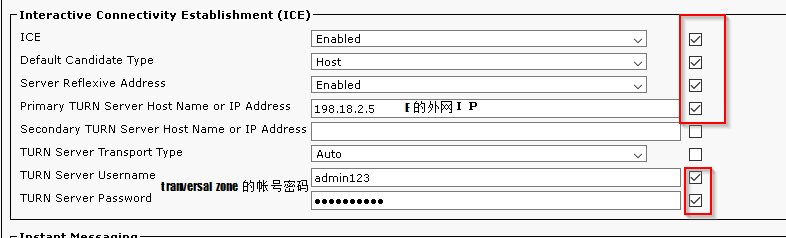
Interactive Connectivity Establishment (ICE) 
Default Candidate Type 
Server Reflexive Address 
Primary TURN Server Host Name or IP Address 
Secondary TURN Server Host Name or IP Address 
Enabled 
Enabled 
TURN 
TURN 
TURN 
Server Transport. Type 
Server Username 
admin123 
Server Password


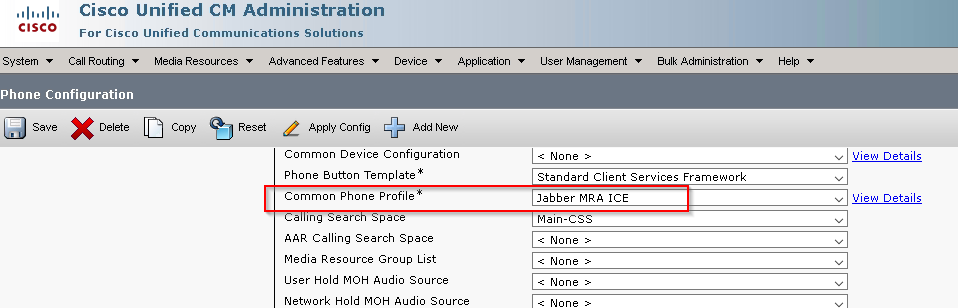
outbound CSF,changes to use this common phone profile

Cisco unified CM Administration 
CISCO 
For Unified Communications Solutions 
Call Media Fesc•urcea Advanced Features 
Applicatic•r, 
l_Eer Management • 
None > 
aulk 
Help 
Phone Configuration 
Save 
2 
Apply Contig 
Add New 
Common Device Configuration 
Phone Button Template 
Common Phone Profile 
AAR Calling Search Space 
Media Resource Group List 
User Hold MOH Audio Source 
Network Hold MOH Audio Source 
Standard Client Services Framework 
Jabber MRA ICE 
Main-css 
< None > 
< None > 
< None > 
< None > 
View Details 
View Details

two off-premise jabber media direct through

Apply a display Filter 
Ca turing from ERernaI (udp and host 198.18.2.38 and host 198.18.2.39) 
It Viewu Go Capture Analyze Statistics Telephony Wireless Tools 
Lan=Q5 
Len=25 
Lan=Q5 
Len=25 
Lan=Q5 
Destination 
1st. 13.2. 39 
1SÜ.13.2.3Ü 
Protocol 
114 
Fr ame 
5. 653731 
S53er„6 
97363M 
Source 
193.1ü.2.33 
193.1ü.2.3s 
Help 
Length 
s; 
s; 
Info 
Binding 
1 egos 
1 egos 
19522 
19522 
. 150 bytes on wire 
(1200 bits), 150 bytes 
captured 
:6ø), Dst: 
(1200 bits) on interface 
Ethernet Il, Src: 
Internet Protocol Version 4, Src: 198.18. 2.38, Dst: 198. 18.2 39 
User Datagram Protocol, Src Port: 19522, Dst Port: 13426


Friday, 13 July 2018

Jabber Custom Tab Popup URL with Calling Number


Jabber Custom Tab Popup URL with Calling Number


This article is to explain the codes that makes Jabber pop up a window in an URL+ Caller ID format pointing your web CRM application. The codes use Javascript to monitor the state of TelephonyConversationEvent and automatically have a popup.

The custom tab is hosted in whatever a web server. And Tpop.js has a reliance on json2.js to parse data in TelephoneyConversationEvent json object. So please download it and put it to the ./js folder


index.html

<!doctype html>
<html lang="en">
  <head>
    <meta charset="utf-8">
    <meta name="viewport" content="width=device-width, initial-scale=1, shrink-to-fit=no">
    <meta name="description" content="">
    <meta name="author" content="">
    <link rel="icon" href="favicon.ico">

    <title>YOUR_APPLICTION_NAME</title>

    <!-- Bootstrap core CSS -->
    <link href="css/bootstrap.min.css" rel="stylesheet">

    <!-- Custom styles for this template -->
    <link href="css/sticky-footer.css" rel="stylesheet">
<script type="text/javascript" src="js/tpop.js"></script>

<script type="text/javascript" src="js/json2.js"></script>
  </head>

               </head>

               <body onload="OnLoadMethods()">
<table class="table table-striped">
  <thead>
<tr>
  <th scope="col">Status</th>
  <th scope="col">Caller ID</th>                                                 
</tr>
  </thead>
  <tbody>
<tr>
  <th id="state" scope="row"> --- </th>
  <td id="callerid"> --- </td>
</tr>
  </tbody>
</table>
               </body>

</html>


Tpop.js

function OnPresenceStateChanged (jid, basicPresence, localizedPresence)
{
var cell = document.getElementById(jid)
cell.innerText = basicPresence.concat(", ",localizedPresence);
}


function OnTelephonyConversationStateChanged(json)
{
var callerid = document.getElementById("callerid");
var state = document.getElementById("state");

var conversation = JSON.parse(json);
if (conversation.acceptanceState == "Pending" && conversation.state == "Started") {
state.innerText = conversation.acceptanceState + "/" + conversation.state + "-> about to screen pop";
for (var i=0; i<conversation.remoteParticipants.length; i++) {
callerid.innerText = conversation.remoteParticipants[i].translatedNumber;
window.open("http://www.google.com/customerSearch.html?number=" + conversation.remoteParticipants[i].translatedNumber);
}
}


}


function SubscribePresence()
{
window.external.SubscribePresence('john.doe@abc.com');
}


function OnLoadMethods()
{
SubscribePresence();
OnTelephonyConversationStateChanged();
}


Demo

 pops up url as http://www.google.com/customerSearch.html?number=+15131112222, remember you can custom it in tpop.js file to make up whatever format you want.


Monday, 9 July 2018

Jabber Custom Tab Pop-up for 911 Disclaimer

Jabber Custom Tab Pop-up for 911 Disclaimer


Preparing Jabber config file 


<?xml version="1.0" encoding="utf-8" ?>
  <config version="1.0">
<Client>
  <jabber-plugin-config>
   <browser-plugin>
     <page refresh ="false" preload="true">
     <tooltip>Disclaimer</tooltip>
     <icon>https://www.cisco.com/web/fw/i/logo.gif</icon>
     <url>http://YOUR_SERVER/disclaimer</url>
    </page>
   </browser-plugin>
  </jabber-plugin-config>
</Client>

  <Options>
  <AllowUserCustomTabs>true</AllowUserCustomTabs>
</Options>

  </config>

<page refresh ="false" preload="true">  Content refreshes each time users select the tab.


Directory structure: 

./disclaimer
 - index.html
 - getback.asp
 - window.asp
 - /js
 - /css


index.html


<!doctype html>
<html lang="en">
<head>
<meta charset="utf-8">
<meta name="viewport" content="width=device-width, initial-scale=1, shrink-to-fit=no">
<meta name="description" content="">
<meta name="author" content="">
<link rel="icon" href="favicon.ico">

<title>911 Disclaimer</title>

<!-- Bootstrap core CSS -->
<link href="css/bootstrap.min.css" rel="stylesheet">

<!-- Custom styles for this template -->
<link href="css/sticky-footer.css" rel="stylesheet">
<script src="js/tpop.js"></script>
</head>

<body>

<body onload="MyPopUp('window.asp')">
<!-- Begin page content -->
<main role="main" class="container">
<h1 class="mt-5">911 Disclaimer</h1>
<p class="lead">During an emergency, softphone technology may not provide the most timely or
accurate location data if used for a 911 emergency call. Calls may be misdirected
to the wrong emergency response center or the emergency response center may make
errors when determining your location. USE A SOFTPHONE ONLY AT YOUR OWN RISK DURING AN EMERGENCY.</p>
</main>


</body>
</html>

window.asp


<!doctype html>
<html lang="en">
  <head>
    <meta charset="utf-8">
    <meta name="viewport" content="width=device-width, initial-scale=1, shrink-to-fit=no">
    <meta name="description" content="">
    <meta name="author" content="">
    <link rel="icon" href="favicon.ico">

    <title>911 Disclaimer</title>

    <!-- Bootstrap core CSS -->
    <link href="css/bootstrap.min.css" rel="stylesheet">

    <!-- Custom styles for this template -->
    <link href="css/sticky-footer.css" rel="stylesheet">
              
  </head>

  <body>

    <!-- Begin page content -->
    <main role="main" class="container">
      <h1 class="mt-5">911 Disclaimer</h1>
      <p class="lead">During an emergency, softphone technology may not provide the most timely or 
accurate location data if used for a 911 emergency call. Calls may be misdirected 
to the wrong emergency response center or the emergency response center may make
 errors when determining your location. <b>USE A SOFTPHONE ONLY AT YOUR OWN RISK DURING AN EMERGENCY.</b></p>
    </main>

    <footer class="footer">
      <div class="container">
        <input type="button" class="btn btn-success" value="Accept" onclick="sendAck(); self.close(); "> 
      </div>
    </footer>
  </body>
</html>


Tpop.js


    // Popup window code
               function MyPopUp(url) {
                var newwindow;
                popupWindow = window.open (
                       url,'popUpWindow','height=400,width=500,left=0,top=200,titlebar=no,sresizable=no,scrollbars=yes,toolbar=no,menubar=no,location=no,directories=no,copyhistory=no,status=no')
               }


Example


Friday, 27 October 2017

Jabber SIP B2B URI calls

Jabber SIP B2B URI calls


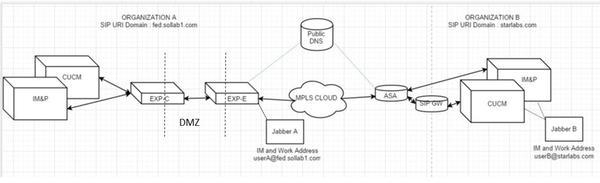
This diagram shows how Expressways convey calls between inbound and outbound. In Cisco document, please check here:
https://www.cisco.com/c/dam/en/us/support/docs/unified-communications/expressway/200928-Jabber-SIP-URI-calls-over-MRA-00.jpeg
The example I use is to let Expressways transmit outgoing calls to WebEx CMR and specific business partners.

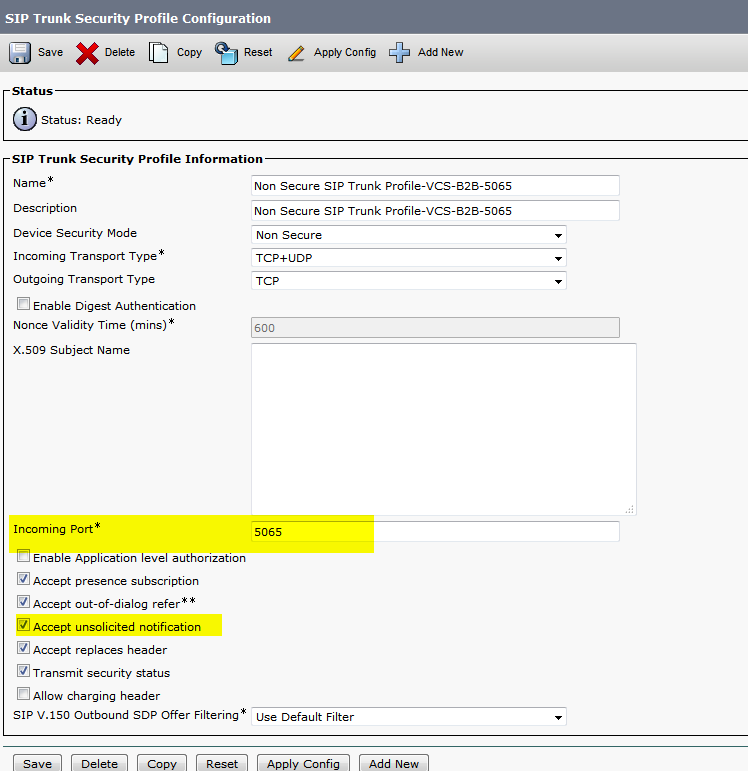
SIP Trunk Security Profile on CUCM

In case of using MRA, please make a different incoming port 5065 instead of default 5060.


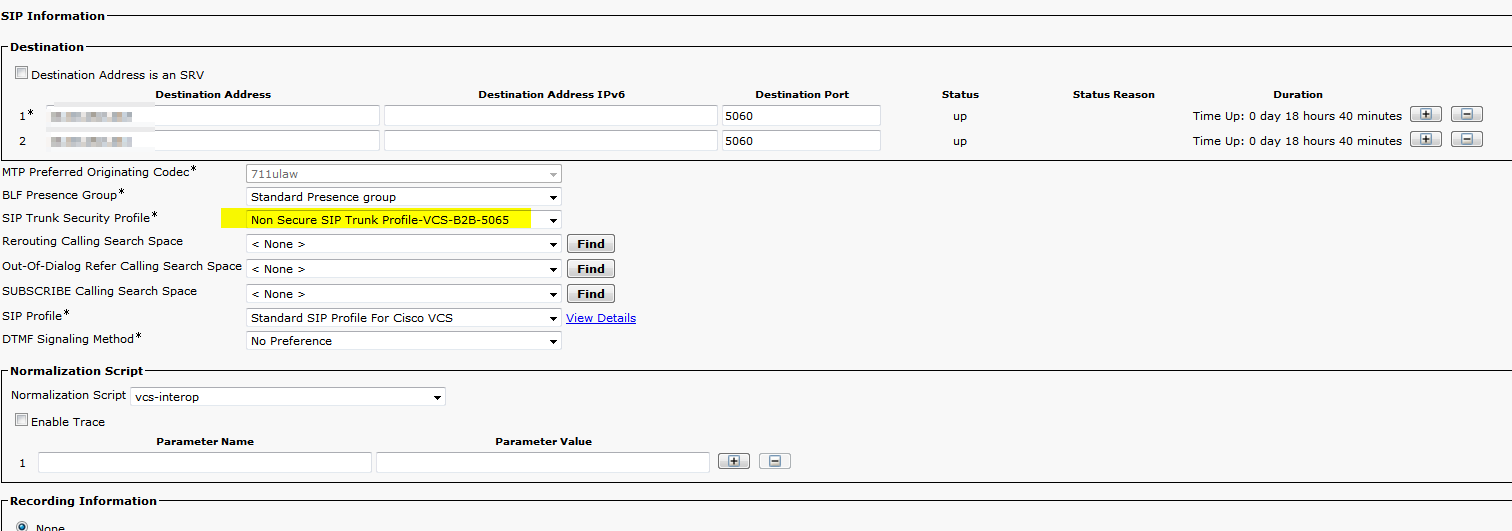
SIP Trunk Configuration on CUCM

My case has two expressway C’s in a cluster. I put in two IPs of them with 5060 destination port.

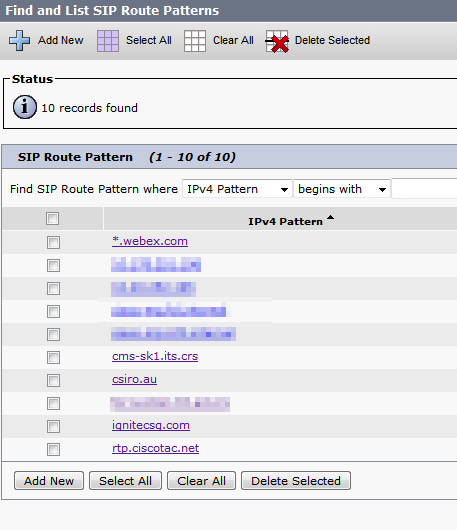
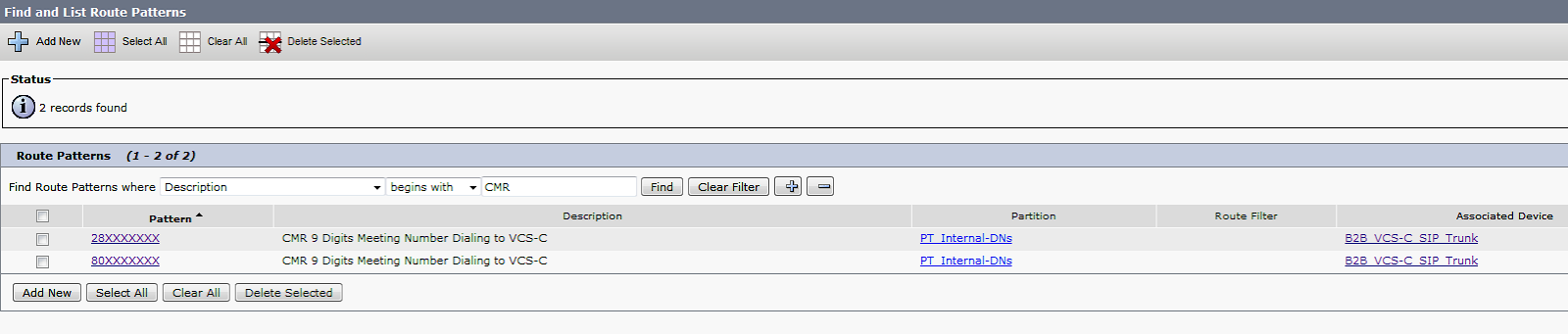
SIP Route Patterns to Expressway C

9-digit simplified WebEx CMR dial-pattern


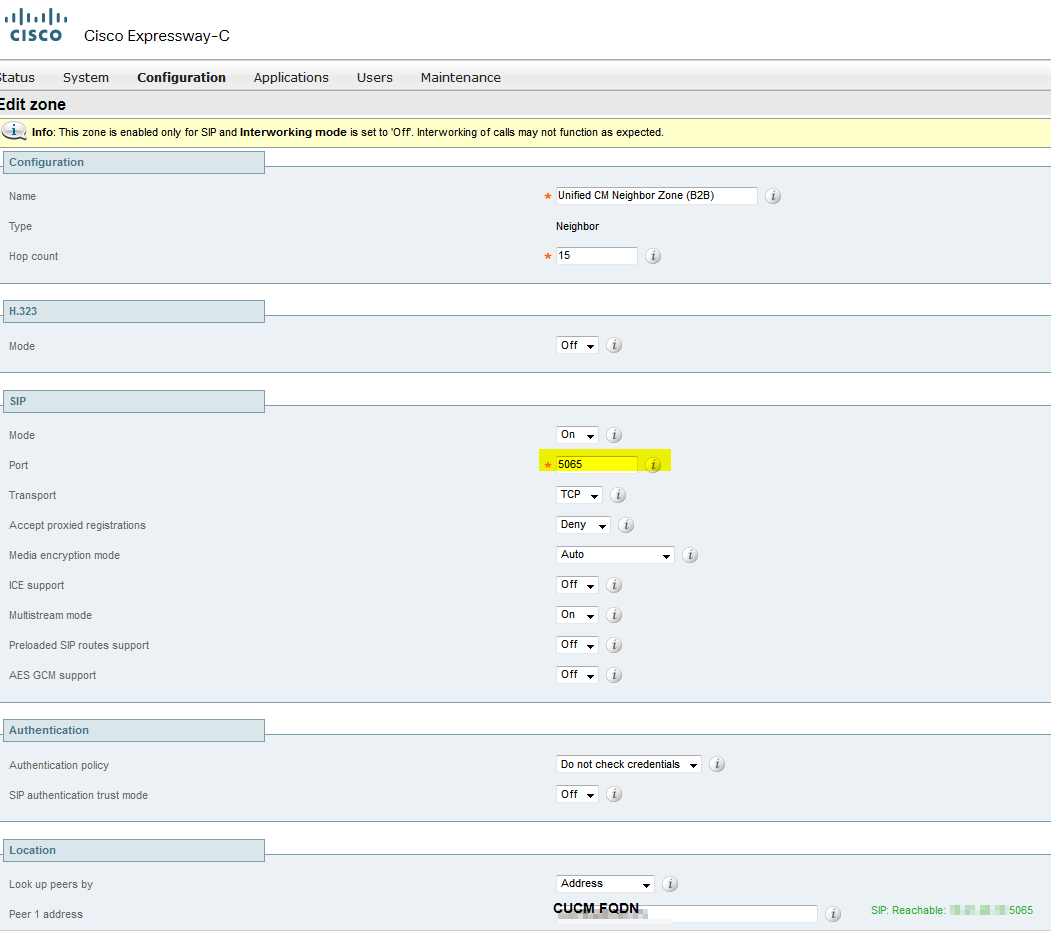
Unified CM Neighbor Zone (B2B) on Expressway C

Why port 5060? see here Registration issue 

Due to 5060/5061 is used for your MRA, change the SIP port on the SIP Trunk Security Profile that is applied to the existing SIP trunk configured in CUCM and the Expressway-C neighbor zone for CUCM to a different port such as 5065.
A diagnostic log from Expressway-C shows a SIP/2.0 405 Method Not Allowed message in response to the Registration request sent by the Jabber client. This is likely due to an existing Session Initiation Protocol (SIP) trunk between Expressway-C and CUCM using port 5060/5061.

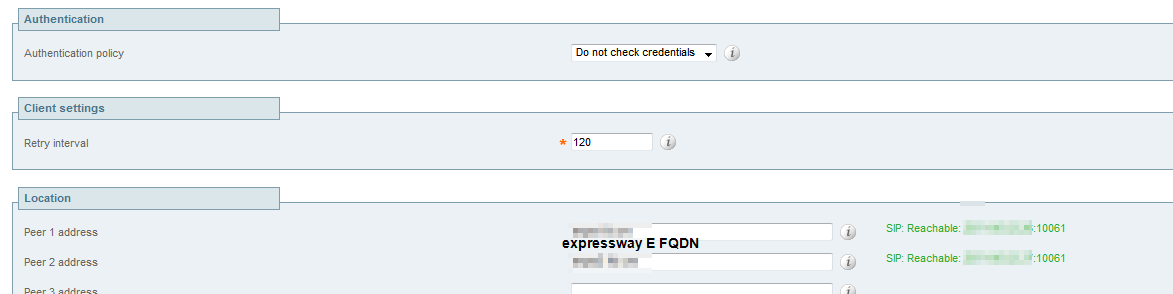
TraversalClient (B2B) Traversal client zone on Expressway C


URI Outbound Search rules on Expressway C

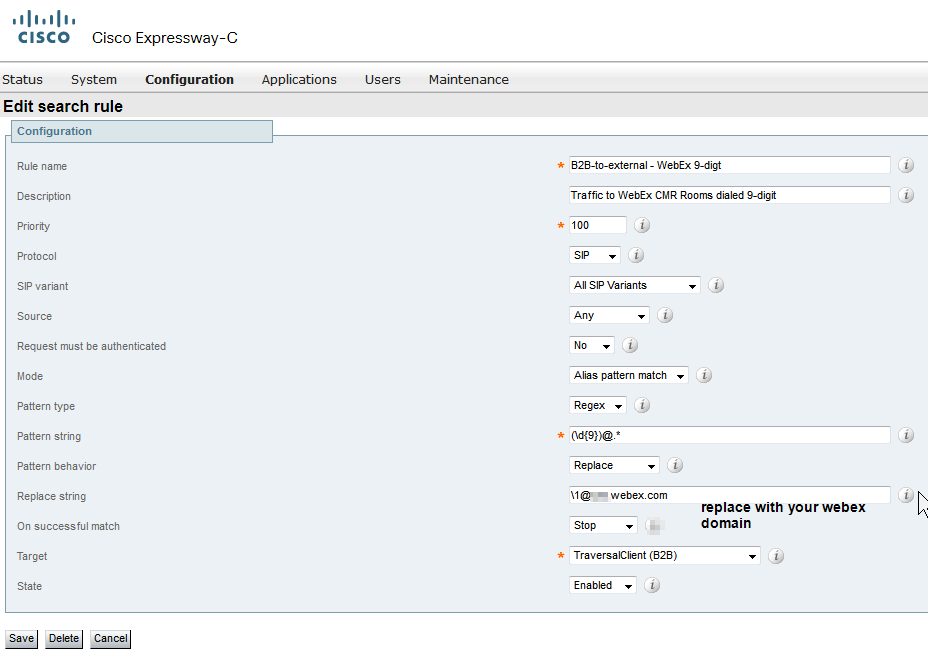
9-digit WebEx Outbound Search rules on Expressway C

Inbound domain call Search rules on Expressway C


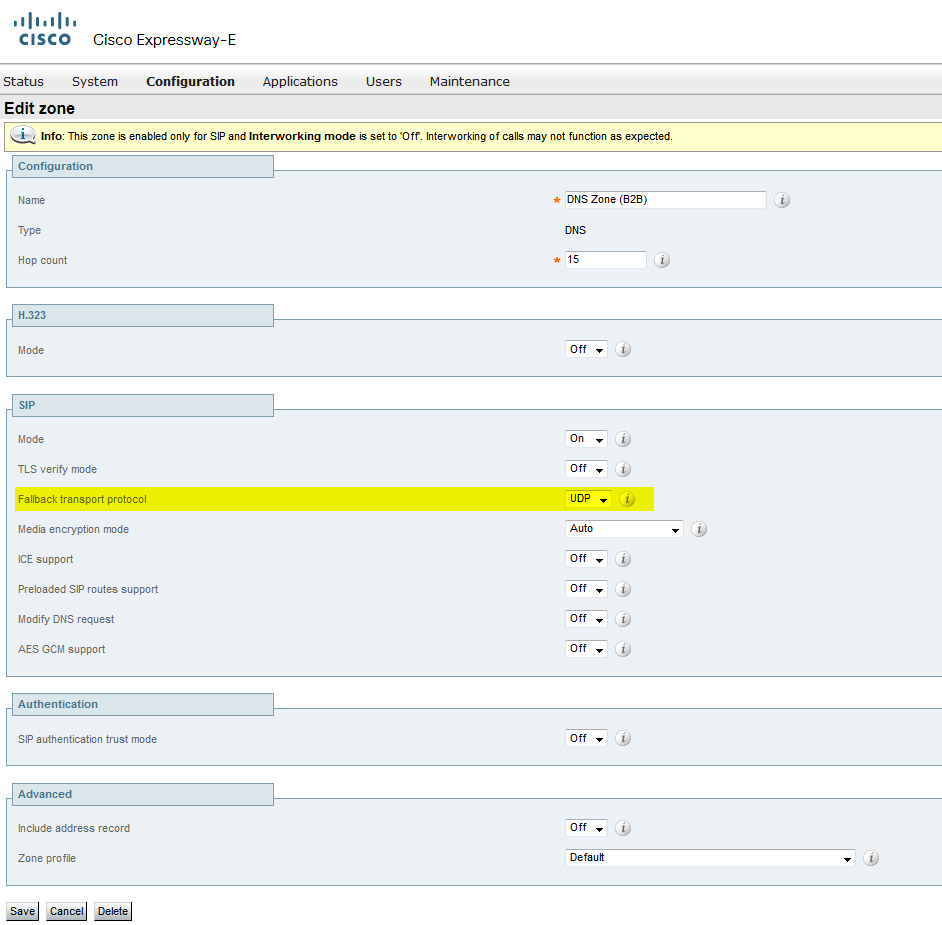
DNS Zone on Expressway E

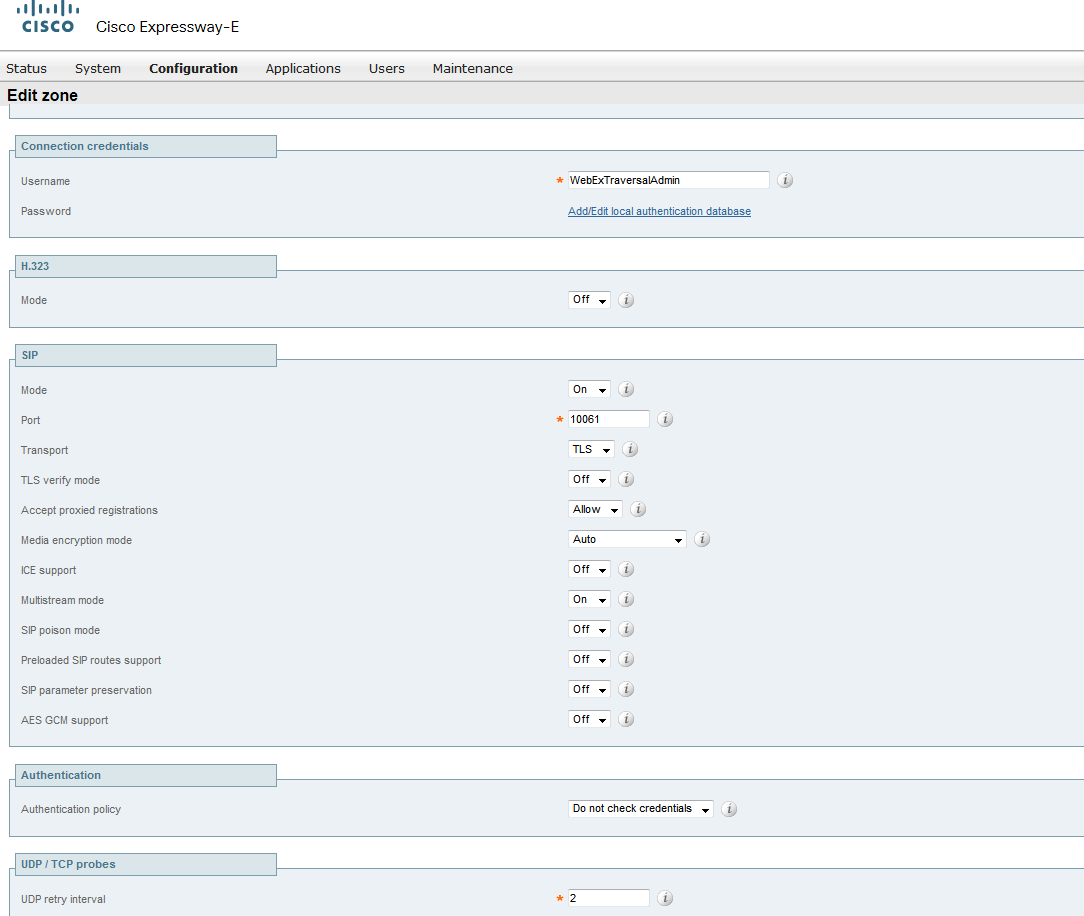
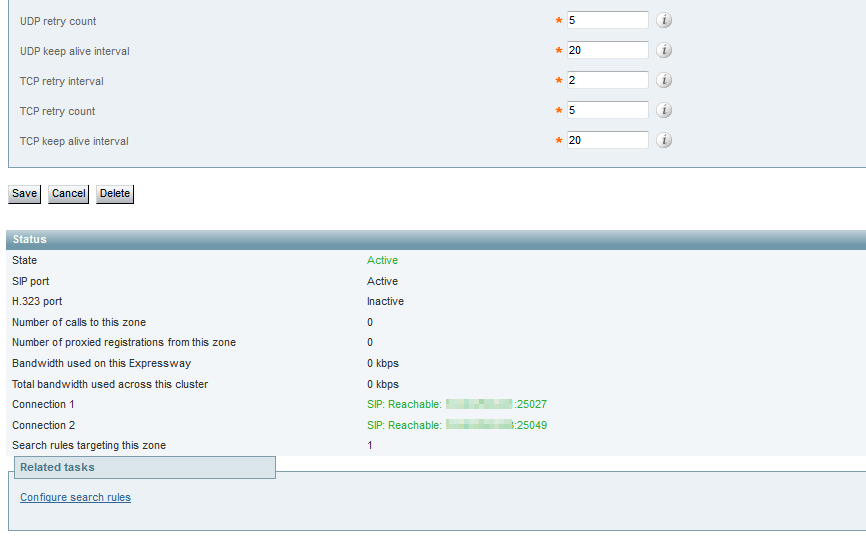
TraversalServer (B2B) Zone on Expressway E


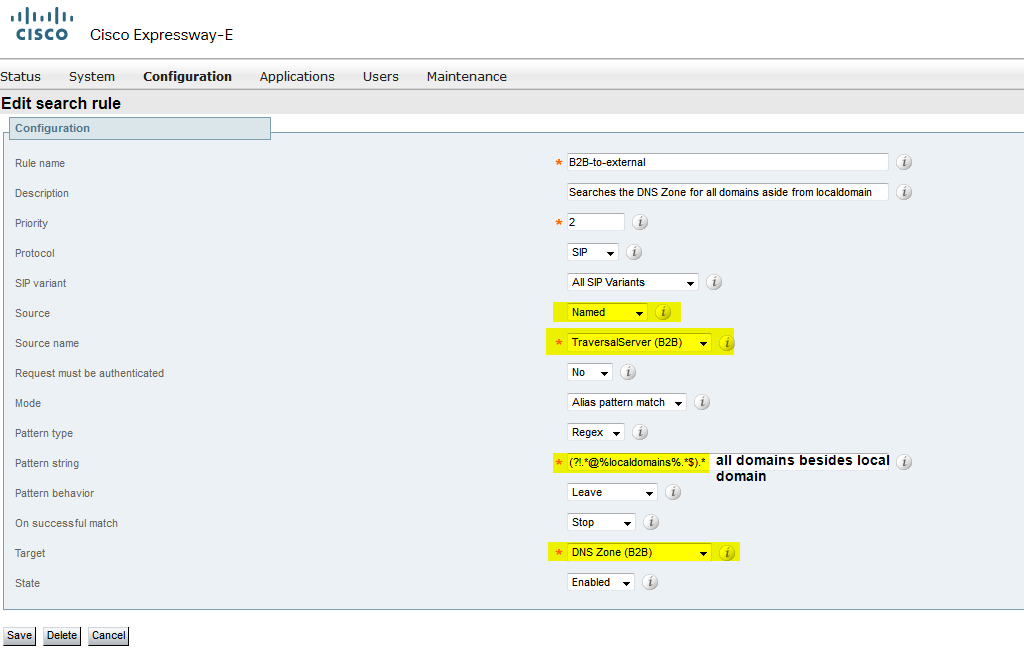
B2B outbound call search rule on Expressway E

I configured only one rule to simply my configuration. It only accepts calls from Server zone on VCS-Core server.

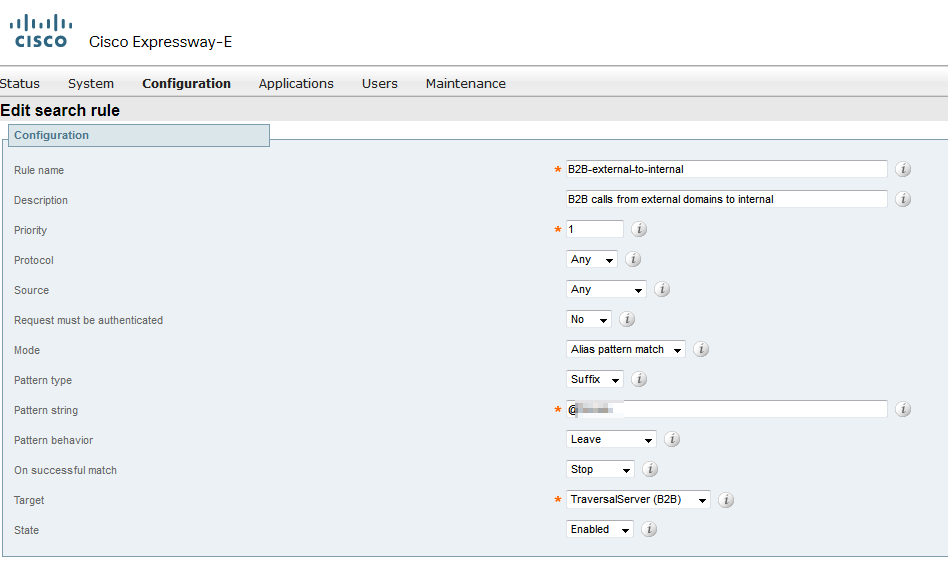
B2B inbound call search rule on Expressway E