import java.io.FileReader;
import java.io.IOException;
import java.io.LineNumberReader;
import java.util.ArrayList;
import java.util.Arrays;
import java.util.List;
import au.com.bytecode.opencsv.CSVReader;
public class ParseCSV {
public static void main(String[] args) throws IOException {
String csvFile = "data1.csv";
String keyword = "fn";
ParseCSV firstname = new ParseCSV();
System.out.println(firstname.ParseCSV(csvFile, keyword));
}
List<String> ParseCSV (String csvFile, String keyword) throws IOException {
FileReader csvfileReader = new FileReader(csvFile);
CSVReader csvReader = new CSVReader(csvfileReader);
FileReader lineReader = new FileReader(csvFile);
LineNumberReader lineNumberReader = new LineNumberReader(lineReader);
List<String> cValue = new ArrayList<String>();
try{
// which column?
String[] nextLine;
csvReader.readNext();
int columnNum;
// find 1st line?
String firstLine = null;
while (lineNumberReader.getLineNumber() == 0){
firstLine = lineNumberReader.readLine();
}
ArrayList<String> list = new ArrayList<String>(Arrays.asList(firstLine.split("\\,")));
columnNum = list.indexOf(keyword);
while ((nextLine = csvReader.readNext()) != null) {
cValue.add(nextLine[columnNum]);
}
} finally{
csvReader.close();
csvfileReader.close();
lineReader.close();
lineNumberReader.close();
}
return cValue;
}
}
=============
sample CSV file:
id,fn,ln,nation,age
1,Lokesh,Gupta,India,32
2,David,Miller,England,34
output:
[Lokesh, David]
Showing posts with label Java Python. Show all posts
Showing posts with label Java Python. Show all posts
Saturday, 24 January 2015

Saturday, 3 January 2015
Form in Django
1. Crate a project named csvt07 and an application called blog
Add the application to setttings.py
INSTALLED_APPS = (
'django.contrib.admin',
'django.contrib.auth',
'django.contrib.contenttypes',
'django.contrib.sessions',
'django.contrib.messages',
'django.contrib.staticfiles',
'blog',
)
2. Setup form procedures
root@10:/home/python/django/csvt07# nano blog/views.py
from django import forms
from django.http import HttpResponse
from django.shortcuts import render_to_response
class UserForm(forms.Form):
name = forms.CharField()
sex = forms.CharField()
def register(req):
if req.method == 'POST':
form = UserForm(req.POST)
if form.is_valid():
print form.cleaned_data
return HttpResponse('ok')
else:
form = UserForm()
return render_to_response('register.html',{'form':form})
3. create template file
root@10:/home/python/django/csvt07# nano blog/templates/register.html
<?xml version="1.0" encoding="UTF-8"?>
<!DOCTYPE html PUBLIC "-//W3C//DTD XHTML 1.0 Strict//EN" "http://www.w3.org/TR/xhtml1/DTD/xhtml1-$
<html xmlns="http://www.w3.org/1999/xhtml" xml:lang="en" lang="en">
<head>
<meta http-equiv="Content-Type" content="text/html; charset=UTF-8" />
<title>Test Form</title>
</head>
<body>
<form method="post">
{{form}}
<input type="submit" value="ok" />
</form>
</body>
</html>
4. add register url
root@10:/home/python/django/csvt07# nano csvt07/urls.py
from django.conf.urls import patterns, include, url
from django.contrib import admin
urlpatterns = patterns('',
# Examples:
# url(r'^$', 'csvt07.views.home', name='home'),
# url(r'^blog/', include('blog.urls')),
url(r'^admin/', include(admin.site.urls)),
url(r'^blog/register','blog.views.register'),
)
5. sync db
root@10:/home/python/django/csvt07# python manage.py syncdb
Add the application to setttings.py
INSTALLED_APPS = (
'django.contrib.admin',
'django.contrib.auth',
'django.contrib.contenttypes',
'django.contrib.sessions',
'django.contrib.messages',
'django.contrib.staticfiles',
'blog',
)
2. Setup form procedures
root@10:/home/python/django/csvt07# nano blog/views.py
from django import forms
from django.http import HttpResponse
from django.shortcuts import render_to_response
class UserForm(forms.Form):
name = forms.CharField()
sex = forms.CharField()
def register(req):
if req.method == 'POST':
form = UserForm(req.POST)
if form.is_valid():
print form.cleaned_data
return HttpResponse('ok')
else:
form = UserForm()
return render_to_response('register.html',{'form':form})
3. create template file
root@10:/home/python/django/csvt07# nano blog/templates/register.html
<?xml version="1.0" encoding="UTF-8"?>
<!DOCTYPE html PUBLIC "-//W3C//DTD XHTML 1.0 Strict//EN" "http://www.w3.org/TR/xhtml1/DTD/xhtml1-$
<html xmlns="http://www.w3.org/1999/xhtml" xml:lang="en" lang="en">
<head>
<meta http-equiv="Content-Type" content="text/html; charset=UTF-8" />
<title>Test Form</title>
</head>
<body>
<form method="post">
{{form}}
<input type="submit" value="ok" />
</form>
</body>
</html>
4. add register url
root@10:/home/python/django/csvt07# nano csvt07/urls.py
from django.conf.urls import patterns, include, url
from django.contrib import admin
urlpatterns = patterns('',
# Examples:
# url(r'^$', 'csvt07.views.home', name='home'),
# url(r'^blog/', include('blog.urls')),
url(r'^admin/', include(admin.site.urls)),
url(r'^blog/register','blog.views.register'),
)
5. sync db
root@10:/home/python/django/csvt07# python manage.py syncdb
use admin page to config database in Django
- Create a project named csvt05 and an application called blog
- Add an application in settings.py
INSTALLED_APPS = (
'django.contrib.admin',
'django.contrib.auth',
'django.contrib.contenttypes',
'django.contrib.sessions',
'django.contrib.messages',
'django.contrib.staticfiles',
'blog',
)
- Make sure admin url is added
root@10:/home/python/django/csvt05# nano csvt05/urls.py
from django.conf.urls import patterns, include, url
from django.contrib import admin
admin.autodiscover()
urlpatterns = patterns('',
# Examples:
# url(r'^$', 'csvt05.views.home', name='home'),
# url(r'^blog/', include('blog.urls')),
url(r'^admin/', include(admin.site.urls)),
)
- Add tables
root@10:/home/python/django/csvt05# nano blog/models.py
from django.db import models
sex_choices = (
('f','female'),
('m','male'),
)
class User(models.Model):
name = models.CharField(max_length=30)
sex = models.CharField(max_length=1, choices=sex_choices)
def __unicode__(self):
return self.name
- Register to admin.py
root@10:/home/python/django/csvt05# nano blog/admin.py
from django.contrib import admin
from blog.models import User
admin.site.register(User)
- Sync db
root@10:/home/python/django/csvt05# python manage.py syncdb
Operations to perform:
Apply all migrations: admin, contenttypes, auth, sessions
Running migrations:
Applying contenttypes.0001_initial... OK
Applying auth.0001_initial... OK
Applying admin.0001_initial... OK
Applying sessions.0001_initial... OK
You have installed Django's auth system, and don't have any superusers defined.
Would you like to create one now? (yes/no): yes
Username (leave blank to use 'colin'): colin
Email address: colin@1.com
Password:
Password (again):
Superuser created successfully.
root@10:/home/python/django/csvt05# python manage.py migrate
root@10:/home/python/django/csvt05# python manage.py makemigrations
- Test
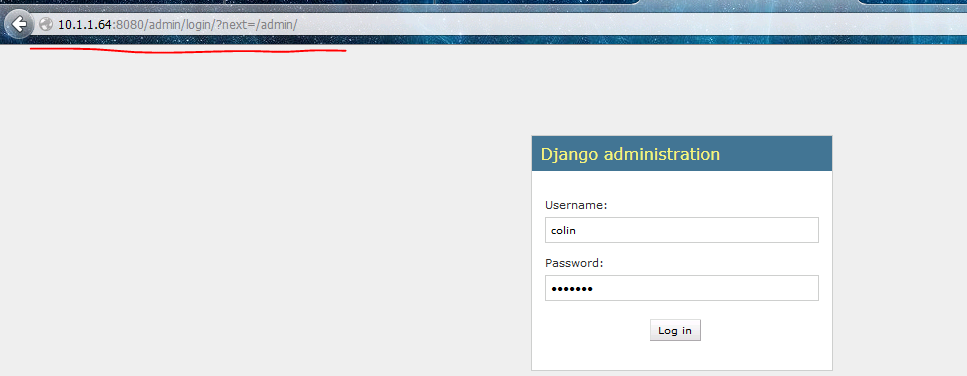
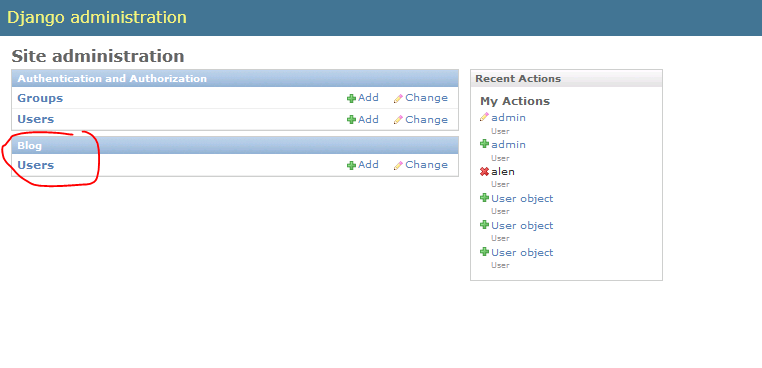

root@10:/home/python/django/csvt05# sqlite3 db.sqlite3
SQLite version 3.7.9 2011-11-01 00:52:41
Enter ".help" for instructions
Enter SQL statements terminated with a ";"
sqlite> .tables
auth_group blog_user
auth_group_permissions django_admin_log
auth_permission django_content_type
auth_user django_migrations
auth_user_groups django_session
auth_user_user_permissions
sqlite> select * from blog_user
...> ;
1|alen|m
2|max|f
3|tom|m
Friday, 2 January 2015
Connect Mysql from Django
1. create a project:
root@10:/home/python/django# django-admin.py startproject csvt03
2. create an app
root@10:/home/python/django# cd csvt03/
root@10:/home/python/django/csvt03# django-admin.py startapp blog
3. setup connection info
root@10:/home/python/django/csvt03# nano csvt03/settings.py
INSTALLED_APPS = (
'django.contrib.admin',
'django.contrib.auth',
'django.contrib.contenttypes',
'django.contrib.sessions',
'django.contrib.messages',
'django.contrib.staticfiles',
'blog', # Add
)
#Add following:
DATABASES = {
'default': {
'ENGINE': 'django.db.backends.mysql',
'NAME': 'csvt',
'USER': 'root',
'PASSWORD': 'password03',
'HOST': '',
'PORT': '',
}
}
4. create database in mysql
mysql -uroot -p
create database csvt default charset=utf8;
5. create table
nano blog/models.py
#Add follwing:
from django.db import models
class Employee(models.Model):
name = models.CharField(max_length=20)
6. synchronize to mysql
root@10:/home/python/django/csvt03# python manage.py syncdb
root@10:/home/python/django/csvt03# python manage.py migrate
root@10:/home/python/django/csvt03# manage.py makemigrations
7. ways to add data into MySQL
root@10:/home/python/django/csvt03# python manage.py shell
In [1]: from blog.models import Employee
In [2]: Employee
Out[2]: blog.models.Employee
In [3]: emp = Employee()
In [4]: emp.name = 'Alen'
In [5]: emp.save()
In [6]: emp = Employee(name='Tom')
In [8]: emp.save()
In [9]: Employee.objects.create(name='Max')
Out[9]: <Employee: Employee object>
In [11]: emp = Employee.objects.create(name='Summer')
mysql> select * from blog_employee;
+----+--------+
| id | name |
+----+--------+
| 1 | Alen |
| 2 | Tom |
| 3 | Max |
| 4 | Summer |
+----+--------+
4 rows in set (0.00 sec)
8. search database
root@10:/home/python/django/csvt03# nano blog/models.py
from django.db import models
class Employee(models.Model):
name = models.CharField(max_length=20)
#add following:
def __unicode__(self):
return self.name
root@10:/home/python/django/csvt03# python manage.py shell
In [1]: from blog.models import Employee
In [2]: emps = Employee.objects.all()
In [3]: emps
Out[3]: [<Employee: Alen>, <Employee: Tom>, <Employee: Max>, <Employee: Summer>
9.display records on web
root@10:/home/python/django/csvt03# nano blog/views.py
from blog.models import Employee
from django.shortcuts import render_to_response
def index(req):
emps = Employee.objects.all()
return render_to_response('index.html',{'emps':emps})
root@10:/home/python/django/csvt03# nano blog/templates/index.html
<?xml version="1.0" encoding="UTF-8"?>
<!DOCTYPE html PUBLIC "-//W3C//DTD XHTML 1.0 Strict//EN" "http://www.w3.org/TR/xhtml1/DTD/xhtml1-$
<html xmlns="http://www.w3.org/1999/xhtml" xml:lang="en" lang="en">
<head>
<meta http-equiv="Content-Type" content="text/html; charset=UTF-8" />
<title>Employee Name</title>
</head>
<body>
{{emps}}
</body>
</html>
root@10:/home/python/django/csvt03# nano csvt03/urls.py
from django.conf.urls import patterns, include, url
urlpatterns = patterns('',
url(r'^index/$','blog.views.index'),
)
root@10:/home/python/django/csvt03# python manage.py runserver 0.0.0.0:8080

10. organizing outputs by using display labels
root@10:/home/python/django/csvt03# nano blog/templates/index.html
<?xml version="1.0" encoding="UTF-8"?>
<!DOCTYPE html PUBLIC "-//W3C//DTD XHTML 1.0 Strict//EN" "http://www.w3.org/TR/xhtml1/DTD/xhtml1-$
<html xmlns="http://www.w3.org/1999/xhtml" xml:lang="en" lang="en">
<head>
<meta http-equiv="Content-Type" content="text/html; charset=UTF-8" />
<title>Employee Name</title>
</head>
<body>
{% for emp in emps %}
<div>{{forloop.counter}} {{emp}}</div>
{% endfor %}
<div>{{emps|length}} records in total</div>
</body>
</html>

root@10:/home/python/django# django-admin.py startproject csvt03
2. create an app
root@10:/home/python/django# cd csvt03/
root@10:/home/python/django/csvt03# django-admin.py startapp blog
3. setup connection info
root@10:/home/python/django/csvt03# nano csvt03/settings.py
INSTALLED_APPS = (
'django.contrib.admin',
'django.contrib.auth',
'django.contrib.contenttypes',
'django.contrib.sessions',
'django.contrib.messages',
'django.contrib.staticfiles',
'blog', # Add
)
#Add following:
DATABASES = {
'default': {
'ENGINE': 'django.db.backends.mysql',
'NAME': 'csvt',
'USER': 'root',
'PASSWORD': 'password03',
'HOST': '',
'PORT': '',
}
}
4. create database in mysql
mysql -uroot -p
create database csvt default charset=utf8;
5. create table
nano blog/models.py
#Add follwing:
from django.db import models
class Employee(models.Model):
name = models.CharField(max_length=20)
6. synchronize to mysql
root@10:/home/python/django/csvt03# python manage.py syncdb
root@10:/home/python/django/csvt03# python manage.py migrate
root@10:/home/python/django/csvt03# manage.py makemigrations
7. ways to add data into MySQL
root@10:/home/python/django/csvt03# python manage.py shell
In [1]: from blog.models import Employee
In [2]: Employee
Out[2]: blog.models.Employee
In [3]: emp = Employee()
In [4]: emp.name = 'Alen'
In [5]: emp.save()
In [6]: emp = Employee(name='Tom')
In [8]: emp.save()
In [9]: Employee.objects.create(name='Max')
Out[9]: <Employee: Employee object>
In [11]: emp = Employee.objects.create(name='Summer')
mysql> select * from blog_employee;
+----+--------+
| id | name |
+----+--------+
| 1 | Alen |
| 2 | Tom |
| 3 | Max |
| 4 | Summer |
+----+--------+
4 rows in set (0.00 sec)
8. search database
root@10:/home/python/django/csvt03# nano blog/models.py
from django.db import models
class Employee(models.Model):
name = models.CharField(max_length=20)
#add following:
def __unicode__(self):
return self.name
root@10:/home/python/django/csvt03# python manage.py shell
In [1]: from blog.models import Employee
In [2]: emps = Employee.objects.all()
In [3]: emps
Out[3]: [<Employee: Alen>, <Employee: Tom>, <Employee: Max>, <Employee: Summer>
9.display records on web
root@10:/home/python/django/csvt03# nano blog/views.py
from blog.models import Employee
from django.shortcuts import render_to_response
def index(req):
emps = Employee.objects.all()
return render_to_response('index.html',{'emps':emps})
root@10:/home/python/django/csvt03# nano blog/templates/index.html
<?xml version="1.0" encoding="UTF-8"?>
<!DOCTYPE html PUBLIC "-//W3C//DTD XHTML 1.0 Strict//EN" "http://www.w3.org/TR/xhtml1/DTD/xhtml1-$
<html xmlns="http://www.w3.org/1999/xhtml" xml:lang="en" lang="en">
<head>
<meta http-equiv="Content-Type" content="text/html; charset=UTF-8" />
<title>Employee Name</title>
</head>
<body>
{{emps}}
</body>
</html>
root@10:/home/python/django/csvt03# nano csvt03/urls.py
from django.conf.urls import patterns, include, url
urlpatterns = patterns('',
url(r'^index/$','blog.views.index'),
)
root@10:/home/python/django/csvt03# python manage.py runserver 0.0.0.0:8080
10. organizing outputs by using display labels
root@10:/home/python/django/csvt03# nano blog/templates/index.html
<?xml version="1.0" encoding="UTF-8"?>
<!DOCTYPE html PUBLIC "-//W3C//DTD XHTML 1.0 Strict//EN" "http://www.w3.org/TR/xhtml1/DTD/xhtml1-$
<html xmlns="http://www.w3.org/1999/xhtml" xml:lang="en" lang="en">
<head>
<meta http-equiv="Content-Type" content="text/html; charset=UTF-8" />
<title>Employee Name</title>
</head>
<body>
{% for emp in emps %}
<div>{{forloop.counter}} {{emp}}</div>
{% endfor %}
<div>{{emps|length}} records in total</div>
</body>
</html>
Thursday, 25 December 2014
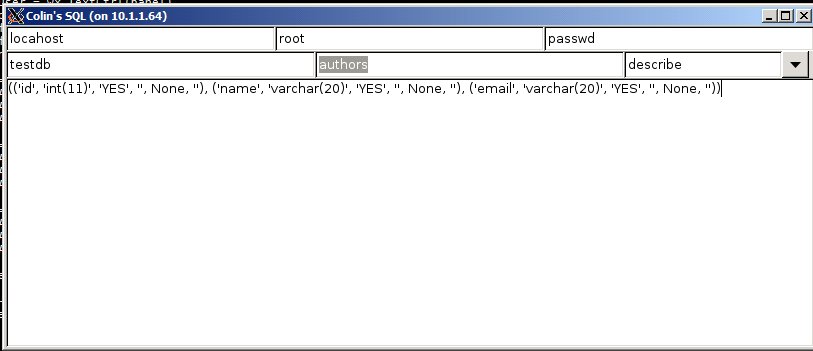
select and describe table in MySQL by using wxpython
#!/usr/bin/python
import wx
import MySQLdb
###############################################
class func:
#------------------------------------
def __init__(self,opt):
"""Constractor"""
self.opt = opt
###############################################
class dbOpt():
#------------------------------------
def __init__(self,host,user,passwd,dbname,tbname):
self.host = host
self.user = user
self.passwd = passwd
self.dbname = dbname
self.tbname = tbname
#------------------------------------
def dbSelect(self):
db = MySQLdb.connect(host=self.host, user=self.user, passwd=self.passwd, db=self.dbname)
selectSql = "SELECT * FROM " + self.tbname
cursor = db.cursor()
cursor.execute(selectSql)
db.commit()
data = cursor.fetchall()
cursor.close()
db.close()
data = "{}".format(data)
return data
#------------------------------------
def dbDescribe(self):
db = MySQLdb.connect(host="localhost", user="root", passwd="1988628",db=self.dbname)
selectSql = "describe " + self.tbname
cursor = db.cursor()
cursor.execute(selectSql)
db.commit()
data = cursor.fetchall()
cursor.close()
db.close()
data = "{}".format(data)
return data
###############################################
class myFrame(wx.Frame):
#-------------------------------------
def __init__(self):
wx.Frame.__init__(self, None, wx.ID_ANY, "Colin's SQL")
# Add a panel, so it looks the correct on all platfroms
panel = wx.Panel(self, wx.ID_ANY)
opts = [func("show tables"),
func("describe")]
sampleList = []
self.cb = wx.ComboBox(panel, size=wx.DefaultSize,choices=sampleList)
self.widgetMaker(self.cb, opts)
self.dbhost = wx.TextCtrl(panel)
self.dbuser = wx.TextCtrl(panel)
self.dbpasswd = wx.TextCtrl(panel)
self.dbfield = wx.TextCtrl(panel)
self.tbfield = wx.TextCtrl(panel)
self.contents = wx.TextCtrl(panel,style=wx.TE_MULTILINE|wx.HSCROLL)
tsizer = wx.BoxSizer()
tsizer.Add(self.dbhost, 1, wx.EXPAND)
tsizer.Add(self.dbuser, 1, wx.EXPAND)
tsizer.Add(self.dbpasswd, 1, wx.EXPAND)
hsizer = wx.BoxSizer()
hsizer.Add(self.dbfield, 1, wx.EXPAND)
hsizer.Add(self.tbfield, 1, wx.EXPAND)
hsizer.Add(self.cb, 0, wx.RIGHT, 5)
vsizer = wx.BoxSizer(wx.VERTICAL)
vsizer.Add(tsizer, 0, wx.EXPAND, 5)
vsizer.Add(hsizer, 0, wx.EXPAND, 5)
vsizer.Add(self.contents, 1, wx.EXPAND|wx.LEFT|wx.RIGHT|wx.BOTTOM)
panel.SetSizer(vsizer)
#-------------------------------------
def widgetMaker(self, widget, objects):
""""""
for obj in objects:
widget.Append(obj.opt, obj)
widget.Bind(wx.EVT_COMBOBOX, self.onSelect)
#-------------------------------------
def onSelect(self, event):
obj = self.cb.GetClientData(self.cb.GetSelection())
if obj.opt == "show tables":
stb=dbOpt(self.dbhost.GetValue(),self.dbuser.GetValue(),self.dbpasswd.GetValue(),self.dbfield.GetValue(),self.tbfield.GetValue())
self.contents.SetValue(stb.dbSelect())
elif obj.opt == "describe":
stb=dbOpt(self.dbhost.GetValue(),self.dbuser.GetValue(),self.dbpasswd.GetValue(),self.dbfield.GetValue(),self.tbfield.GetValue())
self.contents.SetValue(stb.dbDescribe())
# Run the Program
if __name__ == "__main__":
app = wx.App(False)
frame = myFrame()
frame.Show()
app.MainLoop()

Thursday, 11 September 2014
Tuesday, 6 May 2014
Oracle SQL Functions
Concatenation ||
select city||country from location;
1 ATHENSGREECE
2 CHICAGOUNITED STATES
3 CONAKRYGUINEA
4 LIMAPERU
5 MADRASINDIA
6 MANCHESTERENGLAND
7 MOSCOWRUSSIA
8 PARISFRANCE
9 SHENYANGCHINA
10 ROMEITALY
11 TOKYOJAPAN
12 SYDNEYAUSTRALIA
13 SPARTAGREECE
14 MADRIDSPAIN
List city and country with comma with them
select city ||','||country from location;
1 ATHENS,GREECE
2 CHICAGO,UNITED STATES
3 CONAKRY,GUINEA
4 LIMA,PERU
5 MADRAS,INDIA
6 MANCHESTER,ENGLAND
7 MOSCOW,RUSSIA
8 PARIS,FRANCE
9 SHENYANG,CHINA
10 ROME,ITALY
11 TOKYO,JAPAN
12 SYDNEY,AUSTRALIA
13 SPARTA,GREECE
14 MADRID,SPAIN
RPAD and LPAD
padding . on the right side is better to guide your eyes
select rpad(city,35,'.'), temperature from weather;
1 LIMA............................... 45
2 PARIS.............................. 81
3 MANCHESTER......................... 66
4 ATHENS............................. 97
5 CHICAGO............................ 66
6 SYDNEY............................. 69
7 SPARTA............................. 74
adding characters on the left side of rows
select name, lpad(trim('"' from title),47,'*'), page from magazine
1 BERTRAND MONTHLY **************THE BARBERS WHO SHAVE THEMSELVES. 70
2 LIVE FREE OR DIE ***************HUNTING THOREAU IN NEW HAMPSHIRE 320
3 PSYCHOLOGICA ************************THE ETHNIC NEIGHBORHOOD 246
4 FADED ISSUES *****************RELATIONAL DESIGN AND ENTHALPY 279
5 ENTROPY WIT ********************INTERCONTINENTAL RELATIONS. 20
TRIM
trim off double quotations
select title from magazine;
1 THE BARBERS WHO SHAVE THEMSELVES.
2 "HUNTING THOREAU IN NEW HAMPSHIRE"
3 THE ETHNIC NEIGHBORHOOD
4 RELATIONAL DESIGN AND ENTHALPY
5 "INTERCONTINENTAL RELATIONS."
select trim ('"' from title) from magazine;
1 THE BARBERS WHO SHAVE THEMSELVES.
2 HUNTING THOREAU IN NEW HAMPSHIRE
3 THE ETHNIC NEIGHBORHOOD
4 RELATIONAL DESIGN AND ENTHALPY
5 INTERCONTINENTAL RELATIONS.
LOWER, UPPER and INITCAP
select city, upper(city), lower(city), initcap(lower(city)) from weather;
1 LIMA LIMA lima Lima
2 PARIS PARIS paris Paris
3 MANCHESTER MANCHESTER manchester Manchester
4 ATHENS ATHENS athens Athens
5 CHICAGO CHICAGO chicago Chicago
6 SYDNEY SYDNEY sydney Sydney
7 SPARTA SPARTA sparta Sparta
Length
select name, length(name) from magazine;
1 BERTRAND MONTHLY 16
2 LIVE FREE OR DIE 16
3 PSYCHOLOGICA 12
4 FADED ISSUES 12
5 ENTROPY WIT 11
SUBSTR
5 and 8 mean how many characters from most left side exist
select lastname, firstname, substr(phone,5,8) from address where phone like '415-%'
1 ADAMS JACK 555-7530
2 ZACK JACK 555-6842
3 YARROW MARY 555-2178
4 WERSCHKY ARNY 555-7387
5 BRANT GLEN 555-7512
6 EDGAR THEODORE 555-6252
you also can use negative number to show characters for position value, it's relative to the end of the string. for example,
select rpad (lastname||','||firstname,25,'.') as name, substr(phone,-8) as phone
from address where phone like '415-%'
1 ADAMS,JACK............... 555-7530
2 ZACK,JACK................ 555-6842
3 YARROW,MARY.............. 555-2178
4 WERSCHKY,ARNY............ 555-7387
5 BRANT,GLEN............... 555-7512
6 EDGAR,THEODORE........... 555-6252
use this feature only for VARCHAR2 datatype columns, Do not use it with columns that use the CHAR datatyp. CHAR columns are fixed-length columns, so their values are padded with spaces to extend them to the full length of the column.
INSTR
it simply tells you where in the string it found what you were searching for.
select author, INSTR(author,'O') from magazine;
1 BONHOEFFER, DIETRICH 2
2 CHESTERTON, G.K. 9
3 RUTH, GEORGE HERMAN 9
4 WHITEHEAD, ALFRED 0
5 CROOKES, WILLIAM 3
SUBSTR
changing the first name and last name using instr and substr fuctions.
select author, substr(author,instr(author,',')+2)
||' '||
substr(author,1,instr(author,',')-1)
as ByFirstName
from magazine
1 BONHOEFFER, DIETRICH DIETRICH BONHOEFFER
2 CHESTERTON, G.K. G.K. CHESTERTON
3 RUTH, GEORGE HERMAN GEORGE HERMAN RUTH
4 WHITEHEAD, ALFRED ALFRED WHITEHEAD
5 CROOKES, WILLIAM WILLIAM CROOKES
ASCII and CHR
CHR convertsf numeric values to their ASCII character string equivalents
select CHR(70)||CHR(83)||chr(79)||chr(85)||chr(71)
AS CharValues
from DUAL;
1 FSOUG
DUMP
to see each ASCII value, you can use the DUMP function
select DUMP('FSOUG') from DUAL;
1 Typ=96 Len=5: 70,83,79,85,71
SOUNDEX
It is used almost exclusively in a where clause. It has the unusual ability to find words that sound like other words, virtually regardless of how either is spelled.
select author from magazine
where soundex (author) = soundex('banheffer');
1 BONHOEFFER, DIETRICH
one useful purpose for this function is cleaning up mailing lists.
select a.lastname, a.firstname, a.phone
from address a, address b
where soundex (a.lastname) = soundex(b.lastname);
select city||country from location;
1 ATHENSGREECE
2 CHICAGOUNITED STATES
3 CONAKRYGUINEA
4 LIMAPERU
5 MADRASINDIA
6 MANCHESTERENGLAND
7 MOSCOWRUSSIA
8 PARISFRANCE
9 SHENYANGCHINA
10 ROMEITALY
11 TOKYOJAPAN
12 SYDNEYAUSTRALIA
13 SPARTAGREECE
14 MADRIDSPAIN
List city and country with comma with them
select city ||','||country from location;
1 ATHENS,GREECE
2 CHICAGO,UNITED STATES
3 CONAKRY,GUINEA
4 LIMA,PERU
5 MADRAS,INDIA
6 MANCHESTER,ENGLAND
7 MOSCOW,RUSSIA
8 PARIS,FRANCE
9 SHENYANG,CHINA
10 ROME,ITALY
11 TOKYO,JAPAN
12 SYDNEY,AUSTRALIA
13 SPARTA,GREECE
14 MADRID,SPAIN
RPAD and LPAD
padding . on the right side is better to guide your eyes
select rpad(city,35,'.'), temperature from weather;
1 LIMA............................... 45
2 PARIS.............................. 81
3 MANCHESTER......................... 66
4 ATHENS............................. 97
5 CHICAGO............................ 66
6 SYDNEY............................. 69
7 SPARTA............................. 74
adding characters on the left side of rows
select name, lpad(trim('"' from title),47,'*'), page from magazine
1 BERTRAND MONTHLY **************THE BARBERS WHO SHAVE THEMSELVES. 70
2 LIVE FREE OR DIE ***************HUNTING THOREAU IN NEW HAMPSHIRE 320
3 PSYCHOLOGICA ************************THE ETHNIC NEIGHBORHOOD 246
4 FADED ISSUES *****************RELATIONAL DESIGN AND ENTHALPY 279
5 ENTROPY WIT ********************INTERCONTINENTAL RELATIONS. 20
TRIM
trim off double quotations
select title from magazine;
1 THE BARBERS WHO SHAVE THEMSELVES.
2 "HUNTING THOREAU IN NEW HAMPSHIRE"
3 THE ETHNIC NEIGHBORHOOD
4 RELATIONAL DESIGN AND ENTHALPY
5 "INTERCONTINENTAL RELATIONS."
select trim ('"' from title) from magazine;
1 THE BARBERS WHO SHAVE THEMSELVES.
2 HUNTING THOREAU IN NEW HAMPSHIRE
3 THE ETHNIC NEIGHBORHOOD
4 RELATIONAL DESIGN AND ENTHALPY
5 INTERCONTINENTAL RELATIONS.
LOWER, UPPER and INITCAP
select city, upper(city), lower(city), initcap(lower(city)) from weather;
1 LIMA LIMA lima Lima
2 PARIS PARIS paris Paris
3 MANCHESTER MANCHESTER manchester Manchester
4 ATHENS ATHENS athens Athens
5 CHICAGO CHICAGO chicago Chicago
6 SYDNEY SYDNEY sydney Sydney
7 SPARTA SPARTA sparta Sparta
Length
select name, length(name) from magazine;
1 BERTRAND MONTHLY 16
2 LIVE FREE OR DIE 16
3 PSYCHOLOGICA 12
4 FADED ISSUES 12
5 ENTROPY WIT 11
SUBSTR
5 and 8 mean how many characters from most left side exist
select lastname, firstname, substr(phone,5,8) from address where phone like '415-%'
1 ADAMS JACK 555-7530
2 ZACK JACK 555-6842
3 YARROW MARY 555-2178
4 WERSCHKY ARNY 555-7387
5 BRANT GLEN 555-7512
6 EDGAR THEODORE 555-6252
you also can use negative number to show characters for position value, it's relative to the end of the string. for example,
select rpad (lastname||','||firstname,25,'.') as name, substr(phone,-8) as phone
from address where phone like '415-%'
1 ADAMS,JACK............... 555-7530
2 ZACK,JACK................ 555-6842
3 YARROW,MARY.............. 555-2178
4 WERSCHKY,ARNY............ 555-7387
5 BRANT,GLEN............... 555-7512
6 EDGAR,THEODORE........... 555-6252
use this feature only for VARCHAR2 datatype columns, Do not use it with columns that use the CHAR datatyp. CHAR columns are fixed-length columns, so their values are padded with spaces to extend them to the full length of the column.
INSTR
it simply tells you where in the string it found what you were searching for.
select author, INSTR(author,'O') from magazine;
1 BONHOEFFER, DIETRICH 2
2 CHESTERTON, G.K. 9
3 RUTH, GEORGE HERMAN 9
4 WHITEHEAD, ALFRED 0
5 CROOKES, WILLIAM 3
SUBSTR
changing the first name and last name using instr and substr fuctions.
select author, substr(author,instr(author,',')+2)
||' '||
substr(author,1,instr(author,',')-1)
as ByFirstName
from magazine
1 BONHOEFFER, DIETRICH DIETRICH BONHOEFFER
2 CHESTERTON, G.K. G.K. CHESTERTON
3 RUTH, GEORGE HERMAN GEORGE HERMAN RUTH
4 WHITEHEAD, ALFRED ALFRED WHITEHEAD
5 CROOKES, WILLIAM WILLIAM CROOKES
ASCII and CHR
CHR convertsf numeric values to their ASCII character string equivalents
select CHR(70)||CHR(83)||chr(79)||chr(85)||chr(71)
AS CharValues
from DUAL;
1 FSOUG
DUMP
to see each ASCII value, you can use the DUMP function
select DUMP('FSOUG') from DUAL;
1 Typ=96 Len=5: 70,83,79,85,71
SOUNDEX
It is used almost exclusively in a where clause. It has the unusual ability to find words that sound like other words, virtually regardless of how either is spelled.
select author from magazine
where soundex (author) = soundex('banheffer');
1 BONHOEFFER, DIETRICH
one useful purpose for this function is cleaning up mailing lists.
select a.lastname, a.firstname, a.phone
from address a, address b
where soundex (a.lastname) = soundex(b.lastname);
Subscribe to:
Posts (Atom)