Showing posts with label Voice Gateway. Show all posts

Thursday, 12 June 2014

Lab scenario in IPIPGW using SIP and H.323

3001---------h323-----------r2----------sip-----------r3(CME)---------4999
             711                  729

r2
=======
XCD is required

sccp local Loopback0
sccp ccm 142.102.65.254 identifier 1 version 7.0
sccp
!
sccp ccm group 1
associate ccm 1 priority 1
associate profile 1 register sb-xcd
!
dspfarm profile 1 transcode  
codec g711ulaw
codec g711alaw
codec g729ar8
codec g729abr8
maximum sessions 3
associate application SCCP
!
telephony-service
sdspfarm units 2
sdspfarm transcode sessions 3
sdspfarm tag 1 sb-xcd
em logout 0:0 0:0 0:0
max-ephones 1
max-dn 1

!
dial-peer voice 4999 voip
destination-pattern 4999$
session protocol sipv2
session target ipv4:156.26.202.2
dtmf-relay sip-notify
no vad
!
dial-peer voice 3000 voip
destination-pattern 3...$
session target ipv4:142.100.64.12
dtmf-relay h245-alphanumeric
codec g711ulaw
no vad
!                            ---- inbound dial-peer supports both sip and h323
dial-peer voice 2 voip
incoming called-number 4999$
codec g711ulaw            

---------if use transparent , media type is g.729 between 3001 and 4999 and XCD will not be using.
!
dial-peer voice 3 voip
incoming called-number 3001$
codec transparent            -------------codec g729 is default codec
!
Suggestion: combine the above commands in blue into one dp:
dial-peer voice 100 voip
destination-pattern 3001$
incoming called-number .T
session-target ipv4:142.100.64.12
dtmf-relay h245-alphanumeric
no vad
codec g711ulaw

R3
=========================
dial-peer voice 3000 voip
destination-pattern 3...$
session protocol sipv2
session target ipv4:156.26.102.2
dtmf-relay sip-notify
no vad


Because of early-offer using in cucm, cucm will have problem to accept calls with slow-start.
Enable fast-start to solve this problem:


4999 to 3001
r2#show sccp conn
sess_id    conn_id      stype mode     codec   sport rport ripaddr

5          5            xcode sendrecv g711u   17670 2000  142.102.65.254
5          6            xcode sendrecv g729a   17472 2000  142.102.65.254


3001 to 4999
r2#show sccp conn
sess_id    conn_id      stype mode     codec   sport rport ripaddr

1          2            xcode sendrecv g729a   18734 2000  142.102.65.254
1          1            xcode sendrecv g711u   18412 2000  142.102.65.254

Total number of active session(s) 1, and connection(s) 2

Wednesday, 11 June 2014

Adjusting parameters before login the SRE module

Project summary :

  1. Add Vlan 504 and VLan505 in Cisco 3950 router.
Conf t
Vlan 504 (wan-gw1 )
Vlan 505 (wan-gw2)
!
  1. SRE module will add a vty 67 line port as below:
cncan1-wan-gw1#sh line
  Tty Line Typ     Tx/Rx    A Modem  Roty AccO AccI  Uses  Noise Overruns  Int
     0    0 CTY              -    -      -    -    -     3      0    0/0      -      1    1 AUX   9600/9600  -    -      -    -    -     0      0    0/0      -      2    2 TTY   9600/9600  -    -      -    -    -     0      0    0/0      -     67   67 TTY 115200/115200-    -      -    -    -     3      0    0/0      -*   644  644 VTY              -    -      -    -   49    19      0    0/0      -    645  645 VTY              -    -      -    -   49     1      0    0/0      -    646  646 VTY              -    -      -    -   49     0      0    0/0           -Line(s) not in async mode -or- with no hardware support:
3-66, 68-643
Configure the following commands in the line for opening service-module sm 1/0 session:
Line 67
  transport input all
!
cncan1-wan-gw1#service-module sm 1/0 sess
Trying 17.87.152.5, 2067 ... Open
GNS IOS standard config revision 2012-0002 complete
UNAUTHORIZED ACCESS IS STRICTLY PROHIBITED

  1. Add ospf routing protocol, and add sm1/0 , vlan 504 and vlan505 networks , otherwise ssh login will fail.

 router ospf 1
router-id 17.87.152.1
network 17.87.152.1 0.0.0.0 area 17.87.152.0
network 17.87.152.4 0.0.0.3 area 17.87.152.0   (sm 1/0)
network 17.87.152.64 0.0.0.7 area 17.87.152.0 (vlan504)

  1. When adjusting license, we have to change CPU parameters. Before configuring SRE, it’s better to get license key. We could not open console without license key.

Before adjusting CPU paramters:


Adjusting CPU parameters
Changing : Number of virtual sockets: 2


Open console is ok


Wednesday, 4 June 2014

SIP SRST Config Sample

debug tftp event
debug ccsip message

===================================================================================================================================================================

voice service voip
 allow-connections sip to sip
 sip
  registrar server expires max 600 min 60

voice class codec 1
 codec preference 1 g729br8
 codec preference 2 g729r8
 codec preference 3 g711ulaw
 codec preference 4 g711alaw

voice register global
 system message SRST service active
 max-dn 200
 max-pool 10
!
voice register pool  1
 id network 10.132.193.0 mask 255.255.255.0
 voice-class codec 1
!

call-manager-fallback
 secondary-dialtone 9
 max-conferences 8 gain -6
 transfer-system full-consult
 timeouts interdigit 2
 ip source-address 10.128.192.198 port 2000
 max-ephones 100
 max-dn 250
 system message primary SRST Mode
 time-zone 42
 time-format 24


Monday, 12 May 2014

Instructions to slove FXO disconnect problem


Instructions to solve FXO disconnect problem
1 Use Mic of your laptop to record hangup tone around the receiver. In order to avoid background noise, please use the useful protection for mic and phone receiver when recording 2 install cooledit, and open the caputred sampe file. see the similar and repeated wave patterns, that are hangup tones.

3 choose the part with wave and without waves and check and record the duration respectively,it is for cadence parameters. In this case cadence value is 356,fluctuation is 8。

4 Use your mouse to select the part with the tone, and then use analysis tool to record frequency

5 In the anaysis tool, move your mouse at the peak point,it’s the frequency down below. in this case frequency is 465Hz.
6 already recorded enough parameters, to configure router
in the global configure mod
 voice class custom-cptone test                               define cptone name
dualtone disconnect                                                         configure hangup
frequency 465 frequency is 465Hz cadence 356 356      the duration, including with and without voice
voice class dualtone-detect-params 1
freq-max-deviation 25                         diviation parameter, ranges between 440---490 cadence-variation 15
Voice-port 0/2/0 Supervisory disconnect dualtone mid-call                                                                        enable hangup detation Supervisory custom-cptone test enable defined cpton

Supervisory dualtone-detect-params 1 Cptone CN Timeouts wait-release 5

Saturday, 12 April 2014

Forwarding Modes on Cisco Router

How to choose the best router switching path for your network
document ID 13706

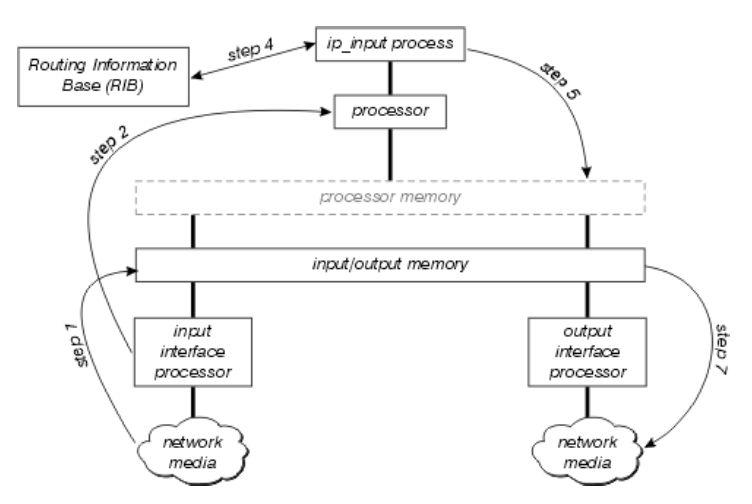
two types of forwarding

prosess switching
interrupt context switching
Process forwarding – looking up routing table every forwardinghttp://hiphotos.baidu.com/cianzhong/pic/item/de825a589c308b082834f08d.jpg
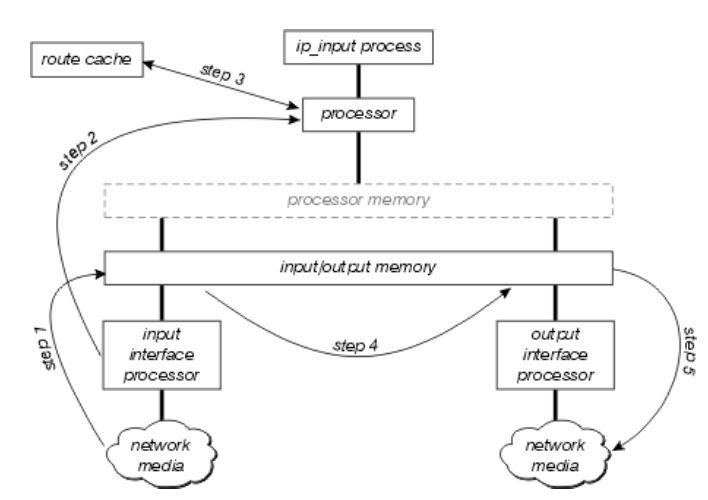
Interrupt swithing
Divided into fast switching,optimum switching  and cisco express forwardinghttp://hiphotos.baidu.com/cianzhong/pic/item/c3285f39ddfece0197ddd891.jpg
Process switching: show ip route {prefix} , " * "available pointer,
Data is transferred according to which load balance type is using. It takes effect when looking up routing table
3-----------------------1---------------------------2----|2.2.2.2
R1上sh ip route 2.2.2.0
* 12.1.1.2
      Route metric is 0, traffic share count is 1 the balancing of load
Only look up the caches .show ip cache ,router 1.2.3 disable IP CEF to enable this feature.
Prefix/Length           Age       Interface       Next Hop
2.2.2.2/32              00:00:08 Serial1/0       12.1.1.2
Caching once for forwarding many times.
how can we pass through cache? Clearing ip cache will trigger process forwarding(only for the first time)


Routing pointer will change every time looking up routing table.
traffic share count {NO.} "


how can we keep process switch  all the time? How do we run it on 12.3 ios above?
no ip cef       to change fast-switch
if)#no ip route-cache   to change process switch
● per packet loadbalancing
process switch only can be per package! Why ? because of "traffic share count is 1"
3--------------------------1---------------------------------------------2--------------|2.2.2.2
                                     fa0/0____________________fa0/0
Assuming the ratio between seria and fastethernet is 3:1
So, the first package will go to Ethernet port, then second, third and fourth … will go to series port.

but when we ping 5 packages, things will be .!!!! because the first package on FA0/0  is encapsulation failed.
● per destinations loadbalancing
fast-switch only can be per-package load-balancing
Enable ip route-cache
Enable ip cef
Won’t generate CACHE (CEF FIB)
ip cef       sh ip cef
Adjacency table includes data link level information  with ARP,
show adjcency detail
IP       Serial1/1                 point2point(5)
                                   0 packets, 0 bytes
                                   0F000800
                                   CEF   expires: 00:02:13
                                         refresh: 00:00:08
                                   Epoch: 0
IP       FastEthernet0/0           192.168.1.2(14)
                                   0 packets, 0 bytes
                                   CC020F6C0000CC01097C00000800 / /  destination MAC,source MAC ,TYPE
                                   ARP        03:54:05
                                   Epoch: 0
CEF?

16 channels for loadbalancing
invisible command:
show ip cef {prefix} internal
#sh ip cef 2.2.2.2 internal
2.2.2.2/32, version 14, epoch 0, per-destination sharing
0 packets, 0 bytes
via 12.1.1.2, 0 dependencies, recursive
    traffic share 1
    next hop 12.1.1.2, Serial1/0 via 12.1.1.0/24
    valid adjacency
via 192.168.1.2, 0 dependencies, recursive
    traffic share 1
    next hop 192.168.1.2, FastEthernet0/0 via 192.168.1.2/32
    valid adjacency
0 packets, 0 bytes switched through the prefix
tmstats: external 0 packets, 0 bytes
           internal 0 packets, 0 bytes
Load distribution: 0 1 0 1 0 1 0 1 0 1 0 1 0 1 0 1 (refcount 1)
Hash OK Interface                 Address         Packets
1     Y   Serial1/0                 point2point           0
2     Y   FastEthernet0/0           192.168.1.2           0
3     Y   Serial1/0                 point2point           0
4     Y   FastEthernet0/0           192.168.1.2           0
5     Y   Serial1/0                 point2point           0
6     Y   FastEthernet0/0           192.168.1.2           0
7     Y   Serial1/0                 point2point           0
8     Y   FastEthernet0/0           192.168.1.2           0
9     Y   Serial1/0                 point2point           0
10    Y   FastEthernet0/0           192.168.1.2           0
11    Y   Serial1/0                 point2point           0
12    Y   FastEthernet0/0           192.168.1.2           0
13    Y   Serial1/0                 point2point           0
14    Y   FastEthernet0/0           192.168.1.2           0
15    Y   Serial1/0                 point2point           0
16    Y   FastEthernet0/0           192.168.1.2           0
How to check current channel for load balancing, invisible command line
ip cef accounting load-balance-hash           "per destination sharing"
  if)#ip load-sharing per-packet                " per packets sharing "
sh ip cef {prefix} internal  
clear ip cef * prefix statistics

Different Commands to Make FAX Work On Cisco

Fax Relay T.38
FAX------------------VG224-----------(MGCP)-------------CM----------(H323)--------------VG

VG:============fax data uses t.38 protocol
dial-peer voice 3856000 voip
destination-pattern 3856...
session target ipv4:156.5.92.235
incoming called-number .T
codec g711ulaw
fax protocol t38 ls-redundancy 2 hs-redundancy 2
fax-relay sg3-to-g3
fax rate 9600
no vad

VG224:==========adds MGCP T.38 commands
ccm-manager fallback-mgcp
ccm-manager redundant-host 156.5.92.239
ccm-manager mgcp
no ccm-manager fax protocol cisco
ccm-manager music-on-hold
ccm-manager config server 156.5.92.234  
ccm-manager config
ccm-manager config dialpeer-prefix
!
mgcp
mgcp call-agent 156.5.92.235 2427 service-type mgcp version 0.1
mgcp rtp unreachable timeout 1000 action notify
mgcp modem passthrough voip mode nse
mgcp package-capability rtp-package
mgcp package-capability sst-package
no mgcp package-capability res-package
no mgcp timer receive-rtcp
mgcp sdp simple
mgcp fax rate 9600
no mgcp fax t38 ecm
mgcp fax t38 inhibit
mgcp rtp payload-type g726r16 static


CM:=========VG224 enables t38 fax relay


Fax Pass-through
FAX------------------ATA187-----------(SIP)-------------CM----------(H323)--------------VG
VG:=============fax uses pass-through method
voice service pots
fax rate disable
!
voice service voip
allow-connections h323 to h323
fax protocol pass-through g711ulaw
h323
 h225 signal overlap
 session transport udp
modem passthrough nse codec g711ulaw

dial-peer voice 1002 voip
destination-pattern 2089....
modem passthrough nse codec g711ulaw
session target ipv4:192.168.100.2
voice-class h323 1
dtmf-relay h245-signal
codec g711ulaw
no fax-relay sg3-to-g3
fax rate disable
no vad
fax nsf 000000
!

CM:===========ATA chooses Fax Pass-through

SIP FAX---------------FAX Server

dial-peer voice 2601 voip
destination-pattern 26103...$
session protocol sipv2
session target ipv4:10.224.3.6:5064
dtmf-relay rtp-nte
codec g711ulaw
fax-relay ecm disable
fax protocol t38 ls-redundancy 0 hs-redundancy 0 fallback none
no vad